Giving proper credit to your marketing efforts
Attribution models allow advertisers to assign credit to each ad interaction a customer has with their ads on the path to conversion.
By using these models, advertisers can gain a deeper understanding of the performance of their ads and optimize their strategies across different conversion journeys.
In this article, you will learn about the different attribution models available and how to implement them in Google Ads.
You’ll discover how to set an attribution model for conversion tracking and bidding, and also how to compare models using the “Model Comparison” attribution report.
Advantages
Traditionally, advertisers have measured the success of their online advertising on a “last click” basis, which assigns all the credit for a conversion to the last-clicked ad and corresponding keyword.
However, this approach overlooks the impact of other ad interactions that customers may have had earlier in the purchase cycle.
By using attribution models, advertisers can gain more control over how credit is assigned to each ad interaction.
This allows them to reach customers earlier in the purchase cycle, tailor their model to match their business needs, and improve their bidding strategies by gaining a better understanding of how their ads perform.
Attribution models
Last click
This model assigns all credit for the conversion to the last-clicked ad and corresponding keyword.

Data-driven
This model is different from the others, as it distributes credit for the conversion based on your account’s past data for that specific conversion action.

It calculates the actual contribution of each interaction along the conversion path using your account’s historical data.
The “Data-driven” model is the default attribution model for most conversion actions.
How data-driven attribution works
Often, customers interact with multiple ads before making a purchase or taking a valuable action on your website. Yet, only the last ad they click on is typically credited for the conversion. But what if it was actually another ad that played a more significant role in their decision-making?
Data-driven attribution takes a different approach. By analyzing how customers interact with your ads, it gives credit for conversions based on their actual impact on your business goals.
Drawing on data from your account, data-driven attribution evaluates the effectiveness of your keywords, ads, and campaigns.
It even includes website, store visit, and Google Analytics conversions from Search (including Shopping), YouTube, Display, and Discovery ads.
With data-driven attribution, each ad interaction along the conversion path is evaluated to determine its actual contribution towards conversions. These models are custom-made for each advertiser.
By analyzing the conversion paths of both converting and non-converting customers, patterns are identified among the ad interactions that lead to conversions.
The model then assigns more credit to those interactions that have a higher probability of leading customers to complete a conversion.
Using this information, you can evaluate the impact of your ads on your business goals. Additionally, if you’re using an automated bid strategy, this information is used to drive more conversions.
Example
Suppose you own a restaurant named “La Belle Epoque” in Paris, France.
A customer discovers your website by clicking on your ads after performing the following searches: “French restaurant Paris,” “French fine dining Paris,” “La Belle Epoque restaurant Paris,” and finally “reserve table La Belle Epoque Paris.”
The customer makes a reservation after clicking on your ad that appeared with the “reserve table La Belle Epoque Paris” search.
In the “Last click” attribution model, the final search term, “reserve table La Belle Epoque Paris,” would receive full credit for the conversion.
In the “Data-driven” attribution model, each search term would receive credit based on its contribution to driving the conversion.
Keep in mind
In some cases, the last click and data-driven attribution models may produce identical results depending on the availability of data.
Attribution models for bidding and conversions
The setting called “Attribution model” in conversion tracking allows you to determine how conversions are attributed for each conversion action. This setting is applicable for website and Google Analytics conversion actions.
The attribution model setting has an impact on how conversions are counted in the “Conversions” and “All conversions” columns. It’s important to note that the “Conversions” column only includes the conversion actions marked as primary conversions.
For example, if you choose “First click” as your attribution model, conversions will be credited to the first ad that customers clicked on before completing a conversion.
Consequently, in your reports, the conversions would be associated with the campaigns, ad groups, ads, and keywords of the first-clicked ad.
It’s worth noting that the attribution model you select only affects the conversion action that it’s applied to, as well as any bid strategies that rely on the data in the “Conversions” column.
Therefore, if you use an automated bid strategy that optimizes for conversions, such as Target cost per action (Target CPA), Enhanced cost-per-click (ECPC), or Target return on ad spend (Target ROAS), your bids will be optimized based on the selected attribution model.
For manual bidding strategies, you can modify your attribution model to assist in bid optimization.
Keep in mind
Switching your attribution model from “Last click” to “Data-driven” can be beneficial in determining which of your ad interactions are most influential.
With data-driven attribution, each ad interaction that contributes to the conversion process is given a value, which can help drive additional conversions while maintaining the same cost per acquisition (CPA).
The model comparison report
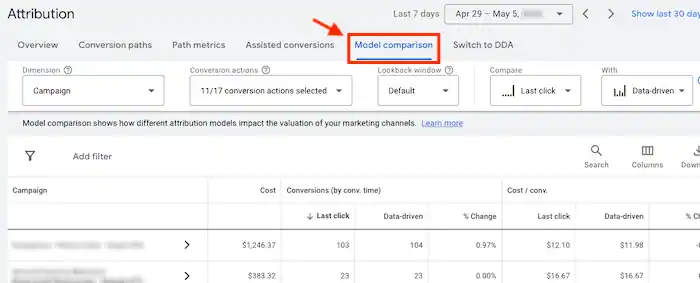
The “Model comparison” report enables you to compare two attribution models simultaneously.
To identify undervalued keywords, ad groups, campaigns, or devices based on a last-click attribution model, you can compare the “Last click” model with the “Data-driven” model to assess the worth of keywords determined by Google’s machine-learning model.
This model examines how your customers convert to distribute credit, providing you with an idea of the value of ad interactions throughout the entire conversion path.
Tip
In the “Model comparison” report, you can compare the “Cost / conv.” and “Conv. value / cost” columns for various attribution models.
This helps you pinpoint undervalued campaigns or keywords that the “Last click” model may have missed.
By using the actual value of your campaigns and keywords across the full conversion path, you can adjust your bids accordingly.
How to choose an attribution model for your conversions
To determine and apply an attribution model for your conversions, you have two options. Firstly, you can select the desired attribution model while configuring your conversion action.
Alternatively, you can refer to the steps below to analyze and modify the attribution model of an already existing conversion action.
Compare Attribution Models in Google Ads
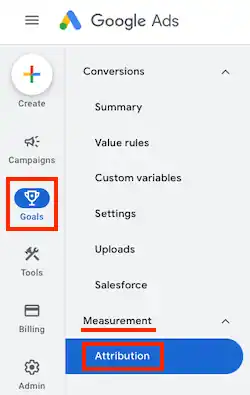
- Click on the Goals icon in your Google Ads account.
- Open the section menu and select “Measurement“.
- Choose “Attribution” from the dropdown.

- Click on “Model comparison” from the left-hand menu.
- Select a specific “Dimension” from the dropdown menu.
- Use the “Compare” and “With” dropdown menus to choose the attribution models that you want to compare.
- You can search for specific keywords, ad groups, campaigns, or accounts using the search box located above the table.
Modify the attribution model for an existing conversion action
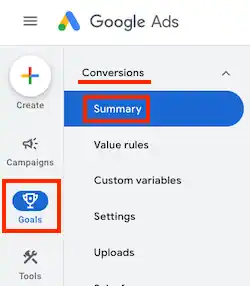
- Access your Google Ads account and click on the Goals icon.
- Select the Conversions option from the dropdown menu in the section menu.
- Click on Summary.
- Choose the conversion you want to modify by clicking on its name in the table.
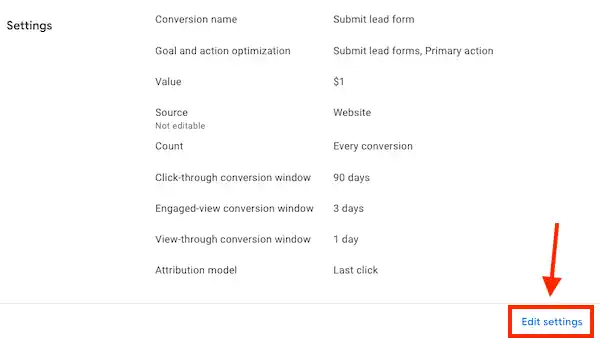
- Click on Edit settings.
- Click on Attribution model and choose the desired attribution model from the dropdown menu.
- Click Save, and then click Done.
Cross-account conversion tracking
To track conversions at the manager account level using cross-account conversion tracking, you need to choose the attribution model in the manager account.
Attribution models and reporting columns
If you’ve updated your “Attribution model” setting for a conversion action, it will only affect how your conversions are counted in your “Conversions” and “All conversions” columns moving forward.
To see how your historic conversions data would appear with the newly selected attribution model, you can add the “current model” columns. These columns are located in the “Attribution” section of the “Columns” menu and include:
- Conversions (current model)
- Cost / conv. (current model)
- Conv. rate (current model)
- Conv. value (current model)
- Conv. value / cost (current model)
- Conv. value / click (current model)
- Value / conv. (current model)
These columns can be beneficial if you recently updated your attribution model and want to evaluate its impact on your conversion data. By comparing these columns to your standard conversion tracking columns, you can determine how your data would have varied if you were already using the newly selected attribution model.
While these columns do not include any conversion actions that you’ve chosen not to mark as primary conversions, cross-device conversions are included by default.
It’s important to keep in mind that these columns include data that isn’t affected by your attribution model selection, such as data from Display Network campaigns using pay-for-conversions billing.