Embracing Automation In Google Ads
Automation is no longer just a buzzword in digital advertising—it’s now a core strategy for managing and scaling campaigns. With frequent updates in advertising platforms, marketers often find themselves balancing between resisting new features and adapting to them. Fortunately, modern automation doesn’t require programming knowledge, making it accessible for everyone. In this article, you’ll explore three powerful ways to use automation in Google Ads—without writing a single line of code.
Understanding Automation In Google Ads
At its core, automation in Google Ads means using system-driven rules and algorithms to manage repetitive tasks. These tasks can include:
- Running A/B ad experiments
- Adjusting bids based on performance metrics
- Enabling or pausing campaigns, ad groups, keywords, or individual ads
- Changing budgets automatically
- Generating reports and sending alerts
Automation simplifies campaign management, reduces human error, and enhances scalability. It’s not just a convenience—it’s a necessity for staying competitive.
Benefits Of Using Automation
Automation delivers a wide range of advantages beyond saving time. Some of the key benefits include:
- Increased efficiency: Spend less time on manual tasks and more on strategic thinking.
- Scalability: Manage larger campaigns without exponentially increasing your workload.
- Data-driven decisions: Use automated insights to make smarter choices.
- Faster results: Run more experiments and iterate quicker.
- Focus on strategy: Free yourself from daily operations and focus on campaign growth.
Using Google’s Built-In Automated Rules
Google Ads offers native automation tools that are often underutilized. The platform has evolved significantly, and now provides a user-friendly experience for setting up experiments and rules.
Creating Experiments
The “Experiments” feature allows you to run A/B tests easily. Simply click on “Experiments” in the menu, then click the “+” button to create a new test. For example, you might choose to test text ad variations within a set of campaigns. You can:
- Replace text in headlines or descriptions
- Add, remove, or pin certain ad elements
- Update URLs and display paths
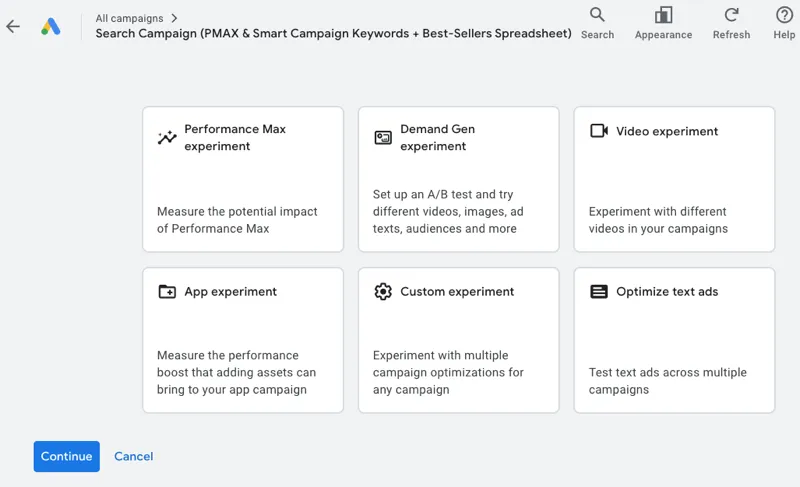
Set your test duration and traffic split (commonly 50/50 for a true A/B test). After the test period, evaluate results and implement winning variations.
Automated Rules
Automated rules are powerful tools that can handle a variety of tasks. Here are a few examples:
- Pause all holiday-specific ads at the end of a seasonal sale using labels.
- Enable regular evergreen ads as the seasonal ones get paused.
- Daily raise bids for keywords that fall below the first-page bid estimate, with a maximum CPC cap.
- Weekly identify keywords with a cost per acquisition (CPA) above a target threshold. These can be paused or sent to your inbox for review.
These rules allow you to maintain campaign performance without constant manual intervention.
Automated Bidding Strategies
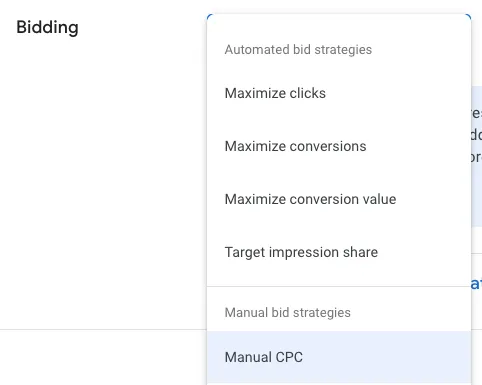
Google’s bidding strategies are now more refined and easier to manage. The platform has consolidated options, so now you can use:
- Maximize Conversions: Automatically adjusts bids to get the most conversions within your budget.
- Maximize Conversion Value: Focuses on getting the highest value conversions (useful for ecommerce).
Each of these strategies allows you to set a target CPA or ROAS within the campaign settings. When structuring your account, group keywords and ad groups with similar goals into campaigns to ensure that the bidding strategy aligns well with your objectives.
Using Custom Script Features Without Coding
Scripts may sound intimidating, but you don’t need to know JavaScript to use them effectively. Many scripts are available as templates where you simply input your data.
What Scripts Can Do
Scripts allow you to automate a wide variety of tasks, such as:
- Bid adjustments based on performance thresholds
- Budget reallocation between campaigns
- Automated reporting to spreadsheets
- Pausing underperforming elements
- Scanning landing pages for content issues
How To Use Scripts
Navigate to Tools and Settings > Bulk Actions > Scripts. Paste in a script from a reliable source like Brainlabs or Optmyzr. You will need to authorize the script to make changes to your account.
For example, the “Low-Quality Score Alert” script from Brainlabs requires you to enter your email, set a quality score threshold, and choose whether to label or pause underperforming keywords. Once set up, the script can run daily or weekly, keeping your account clean and efficient.
Using Third-Party Tools For Advanced Automation
The marketing technology ecosystem is booming with platforms that make automation easier than ever. If you’re looking for more robust automation features without doing any manual coding, consider using third-party tools.
Popular Tools To Consider
- Optmyzr: Offers pre-built automation workflows, custom scripts, and account optimization tools. A great choice for hands-off automation.
- Adalysis: Known for its powerful ad testing features and performance alerts.
- Acquisio: Helps manage and optimize multiple PPC campaigns at scale.
- NinjaCat Reporting: Great for building comprehensive reports with automation built-in.
- Shape: Ideal for budget pacing and cross-channel management.
Many of these tools offer free trials, so you can explore which one fits your needs without upfront cost.
Replicating Automation In Microsoft Ads
Don’t limit automation to just Google Ads. Microsoft Ads has built-in automation tools that mirror many of the Google Ads features. These include:
- Ad Experiments
- Automated Rules
- Automated Bidding Strategies
If you’re advertising across both platforms, you can often reuse your strategies, rules, and scripts with minor adjustments. This reduces your learning curve and doubles your reach.
Final Thoughts On Embracing Automation
Automation is a powerful ally for any PPC marketer. Rather than fearing it, view automation as a tool that frees you from tedious tasks and helps you focus on what truly matters—strategy, analysis, and growth.
The combination of human insight and machine precision is unbeatable. By learning how to implement and manage automation tools, you enhance your value as a digital marketer and improve campaign performance.
Start with the built-in tools from Google Ads, explore scripts for added customization, and level up with third-party platforms. With these three areas alone, you can begin automating your workflow without writing any code—and position yourself for long-term success in PPC advertising.