What is Customer Match?
Customer Match is a powerful advertising feature provided by Google that allows businesses to reach and engage with their existing customers or target audiences who share similar characteristics.
It enables advertisers to leverage their online and offline customer data to create customized advertising campaigns across various Google platforms, including Search, the Shopping tab, Gmail, YouTube, and Display.
With Customer Match, advertisers can upload a customer list containing contact information, such as email addresses or phone numbers, provided by their customers. Google then matches this information with user accounts to identify and target specific individuals or similar audiences.
By doing so, you can deliver personalized and relevant ads to your existing customers or potential customers who exhibit similar traits or behaviors.
Customer Match enables you to leverage both your online and offline data to connect and re-engage with your customers across various platforms, including Search, the Shopping tab, Gmail, YouTube, and Display.
By utilizing the information that your customers have willingly provided, Customer Match allows you to target ads specifically to those customers, as well as to similar audiences who share common characteristics.
Customer Match serves as a valuable advertising tool that caters to various business objectives, ranging from enhancing brand visibility to driving conversions. Here are several examples showcasing the different target audiences you can engage using Customer Match:
- Search Network and Shopping tab: Optimize your campaigns by adjusting bids based on your knowledge about your customers’ activities. This allows you to effectively tailor your advertising strategy to reach the right audience.
- Gmail: Deliver personalized ads to your existing customers or potential customers who share similar interests. These ads are prominently displayed at the top of their inbox tabs, maximizing visibility and engagement.
- YouTube: Expand your reach by targeting audience segments that resemble your most valuable customers. This approach enables you to tap into new market segments that exhibit similar characteristics and behaviors.
- Display: Connect with your existing customers or potential customers who possess similar interests through personalized ads on the Google Display Network. This strategy ensures that your message reaches the right individuals within your target audience.
How it works
To implement the new loyalty program through Google ads and target your existing customers, follow these steps:
Step 1
Begin by creating a customer list data file containing the contact information provided by your customers. You can use the provided template and refer to the accompanying article for detailed instructions on how to format the data correctly.
Step 2
Next, proceed to create or update a campaign specifically designed to target your Customer Match segment. This segment comprises customers from the uploaded data file who are also Google users. Customize your campaign settings accordingly to effectively reach and engage this specific audience.
Step 3
When the users from your Customer Match segment are signed in to their Google accounts, they will encounter your ads across various platforms. These ads will be displayed when they use the Search Network, access YouTube, browse through Gmail, or navigate the Google Display Network.
This multi-channel approach ensures that your ads reach and resonate with your target audience across different touchpoints.
Keep in mind
Customer Match is presently accessible across various platforms, including Search, the Shopping tab, YouTube, Gmail, and Display.
Users who use Google services have the ability to exercise control over the ads they encounter, including Customer Match ads, through their Google Ads Settings. This empowers users to manage their ad preferences according to their own preferences and requirements.
Conditions for using Customer Match
In order to use Customer Match, your account must meet the following requirements:
- Good history of policy compliance: Your account should demonstrate a positive track record of adhering to Google’s advertising policies.
- Good payment history: Maintaining a satisfactory payment history is essential for using Customer Match effectively.
The available features and options within Customer Match depend on the specific requirements your account fulfills:
- All advertisers who are compliant with Google’s policies can use Customer Match and similar audiences for Customer Match in the “Observation” setting, as well as for exclusions.
- If your account has a Google Ads history of at least 90 days and a total lifetime spend exceeding USD $50,000 (or equivalent currency), you gain access to additional features. These include using Customer Match and similar audiences for Customer Match in both the “Targeting” and “Observation” settings, manual bid adjustments, and the ability to set exclusions. For advertisers using currencies other than USD, the spend amount will be converted to USD using the average monthly conversion rate for that currency.
These requirements and corresponding features help ensure that advertisers can leverage Customer Match effectively based on their account history and investment.
| Available Features for Customer Match | Accounts with 90 days of history in Google Ads and more than USD $50,000 lifetime spend | Accounts meeting policy requirements |
|---|---|---|
| "Targeting" setting | Yes | No |
| "Observation" setting | Yes | Yes |
| Similar audiences | Yes | Yes, in "Observation" setting |
| Manual bid adjustments | Yes | No |
| Exclusions | Yes | Yes |
If your account lacks a satisfactory history of policy compliance and fails to meet the aforementioned criteria, it is presently ineligible to use Customer Match.
Furthermore, when it comes to personalized ads on platforms like Google Search, Shopping, Gmail, and YouTube, it is important to adhere to the policies governing the use of first-party and third-party data.
These policies outline the guidelines and regulations surrounding the use of such data for delivering personalized advertisements.
Gathering Customer Data
When utilizing Customer Match, it is crucial to only upload customer information that you have collected in a first-party context. This includes information obtained directly from your websites, apps, physical stores, or any other situations where customers willingly shared their information with you.
Here are a few examples:
- You collected information from a customer who made a purchase on your website.
- You collected information from a customer who registered to receive marketing messages through your mobile apps.
- You collected information from a customer who signed up for your loyalty program at your physical store.
In addition, it is important to:
- Ensure that your privacy policy clearly discloses the sharing of customer data with third parties to perform services on your behalf.
- Obtain appropriate consent for such sharing when required by law or any applicable Google policies related to personalized ads and user consent, including Google’s EU User Consent Policy.
- Use only Google’s approved API or interface for uploading customer data.
- Comply with all relevant laws and regulations, including any self-regulatory or industry codes that may be applicable.
By adhering to these guidelines, you can responsibly collect and use customer data while maintaining compliance with legal and ethical standards.
Further Obligations
Prohibited actions:
- Running ads that collect personally identifiable information, except for Gmail ads with HTML forms that comply with the Gmail ads policy.
- Uploading information for any customer who is under the age of 13 or that was collected from any site or app directed to children under the age of 13.
- Creating ad content that implies knowledge of personally identifiable information or sensitive information about your customers (refer to the details below for further information).
- Using a customer list that targets an overly narrow or specific audience. For instance, combining a customer list with other targeting criteria, such as geographic limitations, is not allowed if it results in an ad targeted to a relatively small number of users.
- Advertising products related to sensitive information, such as pharmaceutical products, in a Customer Match campaign (refer to the details below for more information).
- Running any ads that violate the policies outlined in the Google Ads policies.
Please note that the specific details and explanations related to sensitive information and prohibited ad content can be found below.
Restrictions on Sensitive Categories
Under the Personalized advertising policy principles applicable to remarketing, it is prohibited for advertisers to use sensitive interest categories to target ads towards users or promote their products or services. These policies are also applicable to remarketing with Customer Match.
Moreover, it is not permissible to use data from your Customer Match campaigns to identify sensitive interest categories associated with your customers.
For a comprehensive understanding of what constitutes a sensitive interest category according to the Personalized ads and Customer Match policies, please refer to the Personalized advertising policies.
Consequences of Policy Violation
-
Compliance Review
Google reserves the right to conduct compliance reviews of your business at any time to ensure adherence to the Customer Match policy. If contacted for compliance-related information, it is mandatory to respond promptly and take appropriate corrective action to comply with the policies. If you are a manager account, your managed accounts may also be contacted for verification of compliance.
-
Notification of Non-Compliance
In the event of a suspected violation of the Customer Match policy, Google will notify you and request corrective action. Failure to make the requested corrections may result in the denial of your ability to use Customer Match or suspension of access to your Google Ads accounts. If you wish to appeal a violation of the Customer Match policy, you can contact Google. In cases of severe or repeated violations, your account may be immediately suspended without prior notice. To learn more about suspended accounts and how to proceed, refer to this post.
It is crucial to comply with Google’s policies to ensure a positive and uninterrupted experience with Customer Match and other Google Ads features.
How to create a customer list
Follow these instructions to upload a customer data file and create a new Customer list:
-
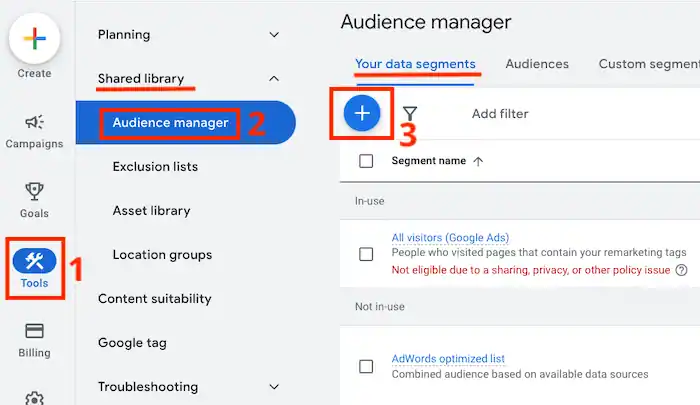
- Sign in to your Google Ads account and click on the Tools icon on the left.
- From the dropdown menu, select “Audience manager” under the “Shared library” section.
- On the Audience manager page, navigate to the “Your data segments” tab at the top.
Note: If you have enabled “Turn on conversion-based lists” in your account settings, you may find customer lists automatically generated by Google for specific conversion goals in this section. - Click on the plus button (+) to create a new segment.
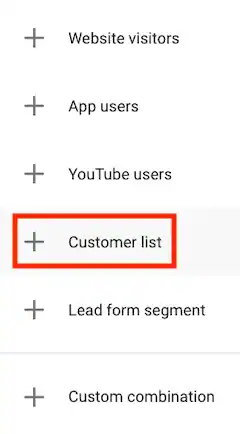
- Choose “Customer list” from the dropdown menu.
 If you receive a message that says “Your account is currently not eligible to use Customer Match. Please refer to customer policies.” that’s because it hasn’t met the necessary criteria yet.
 - Give your new segment a name that accurately describes its purpose.
- Upload your CSV file containing the customer data. Note: Google will automatically determine whether your data is hashed or unhashed when you upload it.
- If you agree with Google’s Customer Match policies and have collected the data in compliance with these policies, check the box that says, “This data was collected and is being shared with Google in compliance with Google’s Customer Match policies.”
- Set a membership duration for your segment. By default, the membership duration is set to unlimited, but you can customize it to a specific time limit if desired.
- Click on “Upload and create” to initiate the upload process.
- You can monitor the progress of your data file upload under the “Audience lists” section. Please note that it may take up to 48 hours for the process to complete.
- Once your data has been successfully uploaded, you will be directed to a file upload success page. This page will provide information on the number of rows that were successfully uploaded and your match rate percentage.
 If you receive a message that says “Your account is currently not eligible to use Customer Match. Please refer to customer policies.” that’s because it hasn’t met the necessary criteria yet.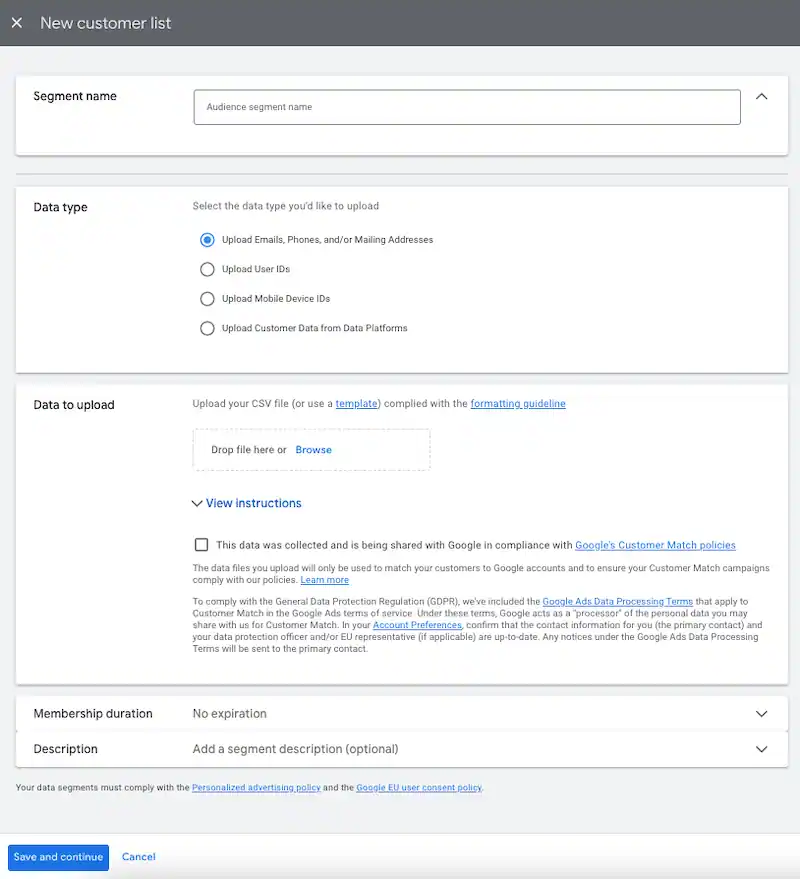
Important considerations
Membership Duration
By default, Customer Match segments have an unlimited membership duration, meaning the customers remain in the segment indefinitely. However, it is recommended to regularly refresh your segment for optimal results. Google Ads will send you an email notification if your segments haven’t been refreshed in a while.
Data Sharing Across Accounts
You have the option to share audience segments across multiple managed accounts under specific conditions:
- If your manager account has a Customer Match segment or Similar segment.
- If a client account shares their Customer Match segment or Similar segment with your manager account. It is crucial to note that all accounts utilizing a Customer Match segment must adhere to the Customer Match policy. Google strictly prohibits sharing or using this data outside of your managed account. Only account owners and administrators with administrator access have the authority to add or remove customer data from Customer Match segments.
Similar Segments
Similar segment targeting, based on your existing Customer Match segments, is available for Search, YouTube, Gmail, and Display. Google will automatically create Similar segments if your Customer Match segments meet the minimum eligibility criteria.
Similar segments can be used in the same manner as Customer Match or your data segments by adding them to ad groups or campaigns.
In the “Audiences” table, you can view the segment size for each available network when a Similar segment is available. Once activated, you can include your Similar segment list in your targeting. If a segment is labeled as “Incompatible” in any of the columns, it indicates that the segment cannot be targeted for that specific property.
Please note that it may take up to 48 hours for your campaign to begin serving once it is set up.
Zapier Integration for Customer Match
You have the option to integrate your customer relationship management (CRM) system data sources with Customer Match using Zapier as your integration partner.
By utilizing Zapier, you can automate the process of uploading new contact details from your CRM system, eCommerce platform, or marketing automation tool directly to your Google Ads customer lists.
This eliminates the need for manual contact uploads, organizing them into appropriate lists, or removing contacts from lists. With Zapier, you can ensure that your customer lists in Google Ads remain up-to-date and synchronized with your CRM system seamlessly.
Using the Google Ads API
Account owners or administrators also have the opportunity to use the Google Ads API for uploading data files and managing their Customer Match segments. Through the API, advertisers can upload data files, add or remove customer data, and modify configurations.
For more detailed information, you can explore the data section of the Google Ads API on the Google Developers website.
Conversion-Based Customer Lists
At the Account Level in Google Ads, you have the ability to opt into conversion-based customer lists. Simply navigate to Account Settings and select the checkbox next to “Turn on conversion-based lists”.
Once you enable this feature, Google Ads will automatically generate Customer Match lists for each specific conversion goal, such as purchases. These lists will be categorized as automatically created conversion-based customer lists within Audience Manager.
They will be continuously updated in real-time with hashed user-provided data whenever new conversions are captured.