GA4 key events vs Google Ads conversions: what's the difference (2026)
 Daniel Timponi · November 15, 2026
A GA4 key event is an action you’ve marked as important in Google Analytics, such as a form submission or a purchase, and it’s used for analysis across all your channels. A Google Ads conversion is an action Google Ads counts for its own reports and can use for bidding. A key event only becomes a Google Ads conversion when you import it into Google Ads (or create a conversion from it), and even then the two numbers rarely match, because each platform attributes, counts and dates them differently.
Not sure which conversions your Google Ads bidding is learning from? I audit and set up conversion tracking across Google Ads, GA4 and Tag Manager. See my conversion tracking service.
Why GA4 renamed conversions to key events
In 2024 Google renamed what GA4 called “conversions” to key events. The data didn’t change; the name did. The reason was confusion: GA4 and Google Ads both said “conversions”, but they counted them differently, and advertisers kept seeing two numbers for “the same” conversion.
Since the change, the words mean this:
- Event: anything GA4 records (
page_view,scroll,generate_lead). - Key event: an event you mark as important in Admin → Data display → Key events (or with the star in the Events list). Used for reports and analysis in GA4.
- Conversion: an action Google Ads counts and can bid on. It can come from the Google Ads tag, from an import (CRM, offline, calls) or from a GA4 key event.
GA4 has since brought the word back in its Advertising section: a conversion created there from a key event is shared with Google Ads, and GA4’s Conversion performance report shows how those conversions perform. So “conversion” now means “something Google Ads can use”, wherever it’s created.
Key events vs Google Ads conversions at a glance
| GA4 key event | Google Ads conversion | |
|---|---|---|
| Purpose | Analysis of behavior and channels | Ads reporting and bidding |
| Channels credited | All channels (organic, social, email, ads) | Google Ads interactions only |
| Can be used for bidding | No, not until it becomes a Google Ads conversion | Yes, if primary (or in a custom goal) |
| Date reported | When the event happened | When the ad click or view happened (by default) |
| Counting | Once per event (default) or once per session | Every or One per click |
| Window | Key event lookback window, set in GA4 | Conversion window, 1 to 90 days (default 30) |
| Attribution | GA4’s reporting attribution model | The conversion action’s attribution model |
| View-through | Not shown for imported GA4 conversions | Available for tag-based conversions |
| Offline and CRM data | Only if sent to GA4 | Native imports (Data Manager, CRM connections) |
Two ways to get a conversion into Google Ads
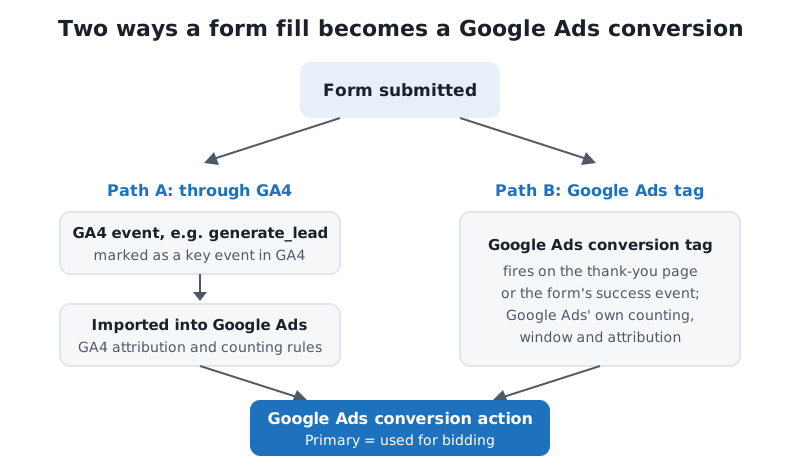
Option A: import a GA4 key event
Requirements: GA4 and Google Ads are linked, auto-tagging is on, and you have edit rights on both. Then, from either side:
In Google Ads
- Go to Goals → Summary → + New conversion action → Import.
- Select Google Analytics 4 properties, then Web.
- Tick the key events you want and finish the import.
In Google Analytics
- Go to Advertising, and under Tools select Conversion management.
- Click New conversion, pick the linked Google Ads account and the key events, and save.
For each key event you can create one web conversion and one app conversion in each linked Google Ads account. Google Ads may mark imported actions as secondary (for example when the account already tracks the same goal) to avoid counting the same event twice, so check the setting afterwards. I walk through the import screen by screen in how to import GA4 conversions into Google Ads.
Option B: a native Google Ads conversion
Create a website conversion action in Google Ads and fire its tag on success: a thank-you page, or better, a custom event your form pushes to the data layer, with a Google Ads Conversion Tracking tag in Tag Manager. Add enhanced conversions and, for leads that close later, offline conversion import from your CRM.
Primary vs secondary conversions
This setting decides what bidding learns from, and it’s where I find most of the problems.
- Primary actions appear in the Conversions column and are used for bidding (when their goal is used by the campaign).
- Secondary actions appear only in All conversions and aren’t used for bidding, except inside a custom goal.
To change it, go to Goals → Summary, find the goal, click Edit goal and choose Primary or Secondary (observe only) under conversion action optimization.
The rule: one action per real-world event is primary. If the form fill is tracked by the Google Ads tag and also imported from GA4, only one of them should be primary. Otherwise every lead counts twice, your cost per conversion halves on paper, and Smart Bidding overbids.
Why the numbers don’t match
GA4 shows 40 generate_lead key events from Google Ads; Google Ads shows 52 conversions. Both can be right. The usual reasons, roughly in order of how often I see them:
- Attribution. GA4 shares credit across every channel, so a lead that clicked an ad and later came back from organic search may be credited partly or wholly to organic. Google Ads only looks at its own ad interactions, so it takes the credit. See Google Ads attribution models explained.
- Dates. Google Ads reports a conversion on the date of the ad click by default; GA4 on the date of the event. A lead on November 3 from a click on October 28 lands in different months. Google Ads has a “by conversion time” version of the conversion columns if you need to compare like with like.
- Counting. GA4 counts once per event by default, so a visitor who submits twice is two key events. A Google Ads action set to One counts one conversion per click.
- Windows. The Google Ads conversion window (default 30 days) and GA4’s key event lookback windows are set separately. Different windows, different totals.
- Consent and blockers. Consent Mode, cookie banners and ad blockers affect the two tags differently, and each platform models missing conversions in its own way. With Consent Mode v2 set up correctly both get better data, but they still won’t match exactly.
- Cross-device and view-through. Google Ads can record conversions across devices from signed-in users and, for tag-based actions, view-through conversions. Imported GA4 conversions show no view-through conversions, and cross-device needs Google signals on in GA4.
- Freshness. Google lists about 3 hours (last click) to 15 hours (other models) for Google Ads tag data, and about 12 to 24 hours for conversions imported from Google Analytics. Yesterday’s numbers are rarely final.
A 10 to 20 percent gap with a consistent direction is normal. A gap that suddenly widens means something broke: a tag stopped firing, a form changed, or consent settings changed. I go through the diagnosis in conversion discrepancies between Google Ads and GA4.
Which one should you use for bidding?
For most lead generation and ecommerce accounts, my answer is:
- Bid on native Google Ads conversions: the Google Ads tag with enhanced conversions for the website action, plus offline imports for qualified leads and sales. They report faster, include view-through and cross-device data, and support the CRM imports that make bidding smart.
- Use GA4 key events for analysis: comparing channels, landing pages and user journeys. That’s what they’re designed for.
- Import GA4 key events as secondary, so you can see them in Google Ads without them steering bids.
GA4 imports as primary are fine in some cases: a small account where GA4 is the only tracking anyone maintains, or an action you can only measure in GA4. Just never leave the same action primary twice.
Common mistakes
- Double counting. The same form fill tracked by the Google Ads tag and a GA4 import, both primary. The most common problem I find in audits.
- Every key event imported. Scrolls, video plays and file downloads imported as primary conversions teach Smart Bidding to buy cheap engagement.
generate_leadfiring on page load. A key event on the thank-you page view counts reloads and bookmarks. Fire it on the form’s success event.- Expecting the numbers to match. Teams spend days reconciling a 12 percent gap that comes from attribution and dates. Look for changes in the gap, not the gap itself.
- Bidding on form fills when sales happen in a CRM. Neither GA4 nor the website tag knows which leads closed. Import that from the CRM.
FAQ
Are GA4 key events the same as conversions?
They are what GA4 called conversions until 2024. Today a key event is for analysis in GA4, and a conversion is what Google Ads counts and can bid on.
Can Google Ads bid on GA4 key events?
Only after you import the key event into Google Ads (or create a conversion from it in GA4) and make it a primary action in a goal the campaign uses.
Why does Google Ads show more conversions than GA4?
Usually attribution: Google Ads credits its own clicks, while GA4 shares credit with organic and other channels. Dates, counting settings, conversion windows and view-through conversions add to the gap.
Should I use the Google Ads tag or import from GA4?
For bidding, I recommend the Google Ads tag with enhanced conversions, plus CRM imports for leads. Import GA4 key events as secondary for comparison.
Does marking a key event change past data?
No. Marking an event as a key event, or changing its counting method, applies from then on and doesn’t rewrite past data.
Need help with GA4 and Google Ads conversions?
I set up conversion tracking so Google Ads bids on the actions that make you money, with no double counting and numbers you can explain. If your GA4 and Google Ads figures disagree and nobody knows which to trust, let’s review your conversion tracking.