Google Ads attribution models explained: data-driven vs last click (2026)
 Daniel Timponi · November 15, 2026
An attribution model decides how Google Ads shares the credit for a conversion between the ad clicks and interactions that came before it. In 2026 Google Ads offers only two models for a conversion action: data-driven, the default, which spreads credit according to how much each interaction appears to have contributed, and last click, which gives all the credit to the last ad clicked. First click, linear, time decay and position-based were retired in 2023.
Not sure your bidding is learning from the right conversions, with the right credit? I review and set up conversion tracking for Google Ads, GA4 and Tag Manager. See my conversion tracking service.
What an attribution model actually does
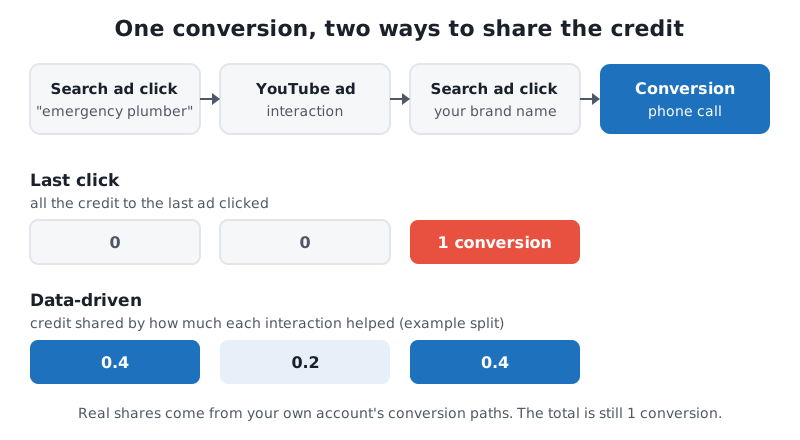
Most people don’t buy on the first click. Someone searches “emergency plumber”, clicks your ad, leaves, watches your YouTube ad two days later, then searches your business name, clicks again and calls. That’s three interactions and one conversion.
The attribution model decides which of those interactions gets the conversion in your reports. With last click, the brand search gets 1 conversion and the other two get 0. With data-driven, the conversion is split, so the generic search might get 0.4, the YouTube ad 0.2 and the brand search 0.4. That’s why you see fractional conversions like 12.7 in accounts using data-driven attribution.
This matters for two reasons:
- Reporting. The model changes the Conversions column, and with it cost per conversion and conversion value for every campaign, ad group and keyword.
- Bidding. Smart Bidding (Target CPA, Target ROAS, Maximize conversions, Maximize conversion value) learns from that same column. A keyword that only ever starts journeys looks worthless under last click, so bidding pulls back from it.
Retired vs current attribution models
Google announced on April 6, 2023 that the four rules-based models (apart from last click) would go away in both Google Ads and Google Analytics. In Google Ads, you could no longer choose them from June 2023, and from September 2023 any conversion action still using one was switched to data-driven. In GA4 they were gone as of November 2023. Google said fewer than 3% of web conversions in Google Ads used them.
| Model | How it gave credit | Status in 2026 |
|---|---|---|
| Data-driven | Based on your account’s own conversion data | Available, the default for most conversion actions |
| Last click | 100% to the last clicked ad | Available |
| First click | 100% to the first clicked ad | Retired (2023) |
| Linear | Equal credit to every interaction | Retired (2023) |
| Time decay | More credit to interactions closer to the conversion | Retired (2023) |
| Position-based | 40% first, 40% last, 20% shared by the middle | Retired (2023) |
If you read an older guide telling you to “switch to position-based for lead gen”, it’s out of date. The choice now is data-driven or last click.
How data-driven attribution works
Data-driven attribution compares the paths of people who converted with the paths of people who didn’t, and gives more credit to the interactions that tend to lead to conversions. Each model is specific to your account and conversion action, so a model for phone calls can behave differently from a model for purchases.
A few facts worth knowing:
- No minimum data to be eligible. Every conversion action can use data-driven attribution regardless of volume. Google says it works better with more data and recommends at least 200 conversions and 2,000 ad interactions in supported networks within 30 days. Below that, the model still runs, but it has less to learn from.
- Which ads it covers. Search (including Shopping), YouTube, Display and Demand Gen interactions can share credit.
- Which conversion actions. The attribution model setting applies to website and Google Analytics conversion actions, and only to the action you change.
Data-driven isn’t magic and it isn’t a black box designed to inflate YouTube. In the accounts I audit, switching from last click to data-driven usually moves a little credit from brand campaigns to generic and upper-funnel campaigns. Total conversions stay the same; where they’re credited changes.
When last click still makes sense
I recommend data-driven for almost every account. Last click is a reasonable choice when:
- You run Search only, mostly on a few keywords, and want reports that match what your CRM or another tool calls “last click”.
- You need a fixed, explainable rule for a client report or a comparison with an older period.
- A conversion action has very little data and you prefer a predictable rule while volume builds.
Just don’t switch models back and forth. Each change resets what bidding sees.
How to change a conversion action’s attribution model
- In Google Ads, go to Goals → Summary.
- Click the conversion action you want to change.
- Click Edit settings.
- Open Attribution model and choose Data-driven or Last click.
- Click Save, then Done.
If you use cross-account conversion tracking from a manager account, the model is set in the manager account, not in each client account.
What happens after you change it
- The new model applies to conversions going forward. Past conversions keep the credit they were given.
- Smart Bidding starts learning from the new credit. Expect some movement for a week or two, and don’t judge a change on the first few days.
- Totals in the Conversions column don’t change much; the split between campaigns, ad groups and keywords does.
I’d make the change at a quiet point, note the date in your change log, and compare the following weeks with the same weeks before.
Attribution reports in Google Ads
To see how the model affects your account, open Goals → Attribution. The reports there are:
- Overview: a summary of your conversion paths.
- Conversion paths: the most common sequences of ad interactions before a conversion.
- Path metrics: how many days and interactions it takes to convert.
- Assisted conversions: how often a campaign, network or keyword helps without being the last click.
- Model comparison: two models side by side, with their effect on conversions, CPA and ROAS.
By default the reports include your primary conversion actions. Performance Max shows up as Cross-Network. Model comparison doesn’t include conversions from the Search Network partners, Gmail or App campaigns.
I use Model comparison before switching a conversion action from last click to data-driven. If generic keywords gain 20% more credit under data-driven, that’s a sign last click has been underselling them, and that bidding will lean into them after the change.
GA4’s attribution settings, and why they differ
GA4 has its own attribution settings, separate from Google Ads, in Admin → Data display → Attribution settings (you need the Marketer role or above).
| Setting | Options | What it changes |
|---|---|---|
| Reporting attribution model | Data-driven, Paid and organic last click, Google paid channels last click | How key event reports in GA4 share credit; applies to past and future data |
| Key event lookback window | Acquisition key events (first_visit, first_open): 30 days (default) or 7. All other key events: 90 days (default), 60 or 30 | How far back an interaction can get credit; applies going forward |
| Channels that can receive credit | Paid and organic channels, or Google paid channels | Which channels can get credit for web conversions shared with Google Ads; applies going forward and to every linked Google Ads account |
Paid and organic last click is what used to be called “last non-direct click”: it ignores direct visits and gives all the credit to the last channel. Google paid channels last click gives the credit to the last Google Ads click, and falls back to paid and organic last click when there isn’t one.
This is why Google Ads and GA4 disagree even when both use data-driven attribution:
- Different candidates. Google Ads shares credit among Google Ads interactions only. GA4, with paid and organic channels, can give the same conversion to organic search, email or direct.
- Different windows. The Google Ads conversion window (set per conversion action, 30 days by default) and GA4’s lookback window are separate settings.
- Different dates. Google Ads reports a conversion on the date of the ad interaction; GA4 on the date of the key event.
The Channels that can receive credit setting also affects GA4 conversions you import into Google Ads. With paid and organic channels, an imported GA4 conversion that GA4 credits to organic search can end up with less credit for Google Ads. If you bid on imported GA4 conversions, check this setting.
I go through the full list of reasons in why Google Ads and GA4 show different conversions, and the difference between the two kinds of conversion in GA4 key events vs Google Ads conversions.
Common mistakes
- Judging campaigns on a model you’re not bidding on. Teams look at last click in GA4, then cut a generic campaign that data-driven in Google Ads credits for half its leads. Read both, but decide budgets on the one your bidding uses.
- Different models on duplicate actions. The same form tracked by the Google Ads tag (data-driven) and a GA4 import (last click), both primary. Fix the double counting first; attribution comes second.
- Switching models to “improve” results. A model change moves credit around; it doesn’t create conversions. If the CPA “improves” after a switch, it’s because credit moved, not because the account got better.
- Bidding on form fills when sales close in a CRM. No attribution model can tell a good lead from a bad one. Import offline conversions from your CRM so the model learns from sales.
- Expecting Google Ads and GA4 to match. They never will. Watch for changes in the gap, not the gap itself.
FAQ
Which attribution models are available in Google Ads?
Two: data-driven (the default for most conversion actions) and last click. First click, linear, time decay and position-based were removed in 2023, and actions still using them were moved to data-driven.
Is data-driven attribution better than last click?
For most accounts, yes, because it credits the searches and ads that start journeys, and Smart Bidding then values them. Last click is simpler and still fine for small Search-only accounts.
Does changing the attribution model change past data?
In Google Ads, no: the new model applies going forward. In GA4, changing the reporting attribution model applies to past and future data, while changing the lookback window or the channels that can receive credit applies going forward.
Why do I see fractional conversions in Google Ads?
Data-driven attribution splits one conversion between several interactions, so a keyword can get 0.3 of a conversion. Summed across the account, the total is still whole conversions.
Where are attribution reports in Google Ads?
Under Goals → Attribution: Overview, Conversion paths, Path metrics, Assisted conversions and Model comparison.
Need help with Google Ads attribution?
Attribution only works if the conversions underneath it are right: one primary action per real result, sensible windows, and real sales coming back from your CRM. I set that up and explain what the numbers mean. If your Google Ads and GA4 reports tell different stories, let’s review your conversion tracking.