Performance Max campaigns explained (2026)
 Daniel Timponi · November 14, 2026
Performance Max (PMax) is a Google Ads campaign type that runs one budget across all of Google’s inventory: Search, Shopping, YouTube, Display, Discover, Gmail and Maps. You give it a conversion goal, creative assets, optional audience signals and search themes, and (for retailers) a product feed; Google’s AI decides where, when and to whom your ads show. It works well when conversion tracking is accurate and there is enough conversion data, and it works badly when it isn’t.
Running Performance Max and not sure it’s working? I manage and audit Google Ads accounts. Book a Google Ads consultation.
How Performance Max works
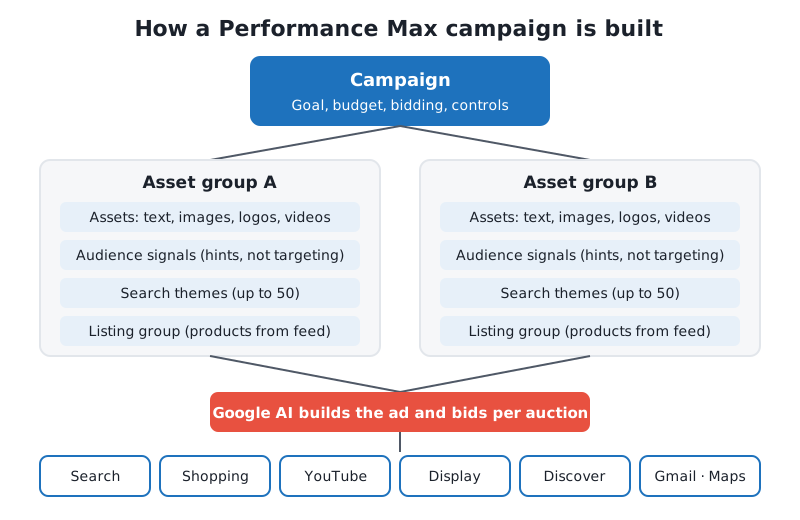
A Performance Max campaign is built around your goal, not around keywords or placements. You tell Google which conversions matter (purchases, leads, calls, store visits) and how to bid for them, and Smart Bidding sets a bid for every auction it enters, on every channel.
What you provide are inputs:
- Conversion goals and a bid strategy: what to optimize for and at what cost or return.
- Asset groups: headlines, descriptions, images, logos and videos that Google combines into ads for each channel.
- Audience signals: hints about who your customers are.
- Search themes: hints about what they search for.
- A product feed from Merchant Center (retail), or a final URL and your website’s pages.
- Controls: negative keywords, brand exclusions, URL rules, location, language, device and age settings.
Google’s AI does the rest: it predicts which auctions are likely to produce your conversion and builds the ad that fits the placement, whether that’s a Shopping ad, a text ad on Search, a YouTube video or a Gmail ad.
PMax replaced Smart Shopping and Local campaigns, which were upgraded to it in 2022.
The channels Performance Max serves on
Google’s channel performance report breaks PMax traffic into these channels:
| Channel | What it covers |
|---|---|
| Search | Text ads and Shopping ads on Google Search, including Search partners |
| YouTube | Video ads across YouTube, including Shorts |
| Google Display Network | Ads on third-party sites and apps (not Gmail or YouTube) |
| Discover | The Discover feed in the Google app and on Android |
| Gmail | Ads in the Promotions and Social tabs |
| Maps | Ads in Google Maps (mostly for location-based goals) |
You can’t switch individual Google channels off. What changed in October 2026 is that Google announced channel prioritization and budget allocation controls for Search, Shopping, Performance Max and Demand Gen, rolling out over the following months. In Performance Max, Google’s own surfaces are grouped as “Google channels”, and you can set Search partners and the Google Display Network to a lower priority and cap the share of daily budget they can take, on a best-effort basis. It’s not an off switch, but it’s the first real lever over where PMax spends. If your account has it, it’s in the campaign settings.
Asset groups
An asset group is a set of creative assets built around one theme, product category or audience. A campaign can hold several. Each asset group contains:
- Up to 15 headlines (30 characters), up to 5 long headlines (90 characters) and up to 5 descriptions.
- Landscape and square images (portrait is optional), up to 20 images, plus logos.
- Videos. If you add none, Google may generate videos from your images and text. They are rarely as good as a short video you made yourself.
- A final URL, business name and call to action.
- For retail, a listing group: the products from your feed that this asset group can show.
Aim for Ad Strength “Excellent” by filling every slot with assets that are genuinely different from each other, not 15 versions of the same sentence. Google also reports that adding video and including horizontal, square and vertical formats increases conversions, which matches what I see in accounts that rely only on auto-generated video.
How many asset groups? Split by what changes the message or the landing page: product categories, services, or audiences that need different creative. Splitting by tiny differences only spreads conversion data thin.
Audience signals
Audience signals tell Google where to start looking: your customer lists (Customer Match), website visitors, custom segments built from search terms or competitor URLs, interests and demographics.
The most misunderstood point: audience signals are not targeting. Google’s own help says ads may serve to people outside your signal when the AI predicts that will help reach your goal. A signal shortens the learning period; it doesn’t fence the campaign in. If you need hard audience targeting, Performance Max is the wrong campaign type (look at Demand Gen or Search with audiences).
Your own data (customer lists, converters, high-value buyers) is the strongest signal you can give.
Search themes
Search themes are words or phrases about what your customers search for, added per asset group (up to 50 per asset group since 2025). They are the closest thing PMax has to keywords:
- They have the same priority in the auction as phrase and broad match keywords in Search campaigns.
- They are additive: they add to the queries PMax already finds from your assets, feed and landing pages; they don’t limit it.
- In the search terms insights, a Source column tells you whether a query came from your search themes or from PMax’s own keywordless matching.
Use them to point PMax at intent it might not find on its own, such as a new service your website doesn’t describe well yet.
Brand exclusions and negative keywords
This is where PMax changed most since launch.
Brand exclusions (campaign level) stop PMax from showing on searches for brands you choose, usually your own. They also catch misspellings and other scripts of a brand name, which negative keywords don’t. Retailers with a feed can apply them to Search text ads only, so Shopping ads can still show on brand searches. If your brand campaign in Search is doing its job, a brand exclusion in PMax keeps PMax from taking credit for people who were already looking for you.
Negative keywords are now fully available in Performance Max:
- Campaign-level negative keywords: up to 10,000 per campaign. They apply to Search and Shopping inventory only.
- Shared negative keyword lists can be applied to several PMax campaigns at once (added in 2025).
- Account-level negative keywords: up to 1,000, applied to every campaign in the account, PMax included. Good for brand suitability (“free”, “jobs”, “cheap” for a luxury brand).
Negative keywords don’t match close variants, so add the variants you care about. For more on this, see my guide to Google Ads automated bidding strategies, since negatives and bidding interact: excluding cheap traffic raises your CPA ceiling in practice.
Who wins when PMax and Search compete for a query
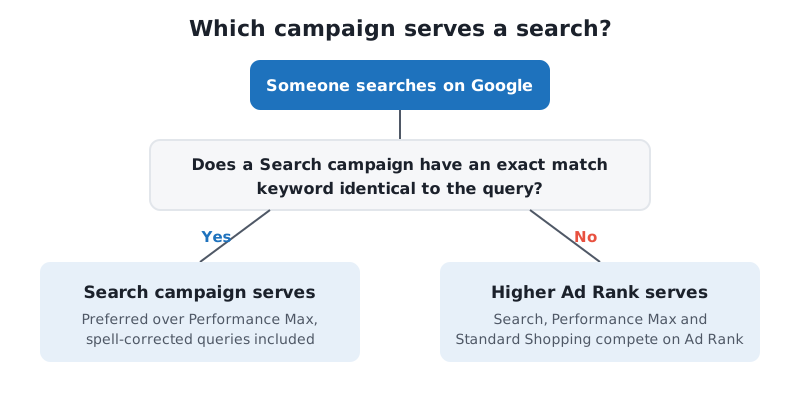
If a Search campaign has an exact match keyword identical to the query (including spell-corrected versions), the Search campaign is preferred over PMax. Otherwise, the campaign with the higher Ad Rank serves. Since late 2024, the same applies between PMax and Standard Shopping: Ad Rank decides, PMax no longer wins automatically.
Reporting: what you can see in 2026
PMax used to be a black box. In 2026 it’s grey:
- Channel performance report (Campaigns → Channel performance, or the campaign’s Insights and reports): impressions, clicks, conversions, conversion value and cost by channel, with data from June 2025 onwards. Since late 2025 it’s available in all Performance Max campaigns, and Search partners were added to it.
- Search terms report: the actual queries that triggered your ads, available for all PMax campaigns since 2025, where you can add queries as negatives directly.
- Search terms insights: queries grouped into categories, with the Source column described above.
- Asset reporting: conversions, cost and clicks per asset, so you can replace what doesn’t work instead of guessing from the old “Low/Good/Best” labels.
- Placement report: where your ads showed on Display and YouTube, which you then exclude at account level if needed.
- New customer acquisition reporting: how many conversions came from new versus returning customers.
I check the channel report first in every PMax audit. If most of the spend goes to Display and YouTube while the conversions come from Search, that’s a question worth asking: are those Display conversions real, or are they low-quality leads and view-through conversions?
Product feeds for retail
For ecommerce, Performance Max is the main way to run Shopping ads alongside every other channel. You link Google Merchant Center, choose which products the campaign can use, and split them into asset groups and listing groups.
- Feed quality is your targeting. Titles, descriptions, product types and custom labels decide which searches your products match. Rewriting product titles to match how people search is still one of the highest-return jobs in a retail account.
- Feed-only PMax (a campaign with a feed and few or no creative assets) mostly behaves like Shopping. Some retailers run it deliberately to keep PMax close to the Shopping inventory.
- Custom labels (margin, bestseller, seasonal) let you split products by what you want to bid differently on.
If you’re new to product ads, start with my explanation of Google Shopping ads.
Bidding in Performance Max
PMax only uses Smart Bidding:
- Maximize conversions, or Target CPA when you want to steer towards a cost per conversion (until June 2026 Google called it “Maximize conversions with a target CPA”).
- Maximize conversion value, with an optional target ROAS.
There’s no manual CPC and no Maximize clicks. Value-based bidding (conversion value with a target ROAS) is the better choice whenever your conversions are worth different amounts, and Google says switching from target CPA to target ROAS gave 14% more conversion value at a similar ROAS in its own data. You can also bid more for new customers with the new customer acquisition goal.
Practical rules I follow:
- Start without a target (or with a realistic one based on the last 30 days), then add or tighten it once the campaign has stable conversion volume.
- Change targets in steps of about 10–20%, not 50%.
- A campaign limited by budget can’t learn properly. If you can’t afford the budget a target CPA needs, the target is the problem, not the algorithm.
More detail in Target CPA bidding explained.
When to use Performance Max vs Search or Shopping
| Situation | My usual choice |
|---|---|
| Ecommerce with a good feed and reliable purchase tracking | Performance Max, often with Standard Shopping for specific products |
| Lead generation where lead quality varies a lot | Search first; PMax only once offline conversions (qualified leads, sales) are imported |
| Small budget, a few hundred dollars a month | Search with tight keywords; PMax needs more data than that budget produces |
| Local business wanting store visits or calls | Performance Max with a store goal can work well, with Search for core services |
| You need to control exactly which keywords you pay for | Search |
| You want to reach people before they search | Demand Gen rather than PMax |
PMax is not a replacement for Search. In most lead-generation accounts I run, Search stays the core and PMax is added once tracking can tell good leads from bad.
Common mistakes I see in Performance Max
- Optimizing for the wrong conversion. A PMax campaign counting page views, scrolls or “contact page visit” as conversions will find a lot of cheap page views. Only primary conversions that represent real business value should be bidding goals.
- Lead forms full of spam. PMax is very good at finding people who fill in forms, including bots. If every submission counts as a conversion, Display and Gmail can fill up with junk leads while the report looks great.
- No brand exclusion. PMax then shows on your own brand name, reports cheap conversions, and looks better than it is.
- Audience signals treated as targeting. They aren’t, and expecting them to be leads to wrong conclusions.
- One asset group for everything. Different products or services need different headlines and landing pages.
- Final URL expansion left on without checking. It can send traffic to blog posts, careers pages or the privacy policy. Add URL exclusions, or turn it off if your landing pages are specific.
- Judging it too early. Give a new campaign a few weeks and stable budgets before making big changes.
Measurement decides your Performance Max results
Everything above depends on one thing: what you tell Google a conversion is. PMax has fewer manual controls than any other campaign type, so the conversion data is your main control. If tracking counts duplicates, misses phone calls, or can’t tell a sale from spam, the AI optimizes towards the wrong people, and it does so very efficiently.
What good PMax measurement looks like:
- One clean primary conversion per real outcome (purchase, qualified lead, booked call), set as the campaign’s goal, with micro-conversions as secondary.
- Enhanced conversions on, so conversions are matched even when cookies are missing.
- Offline conversion import from your CRM for lead generation, so PMax learns which leads became customers, not only which ones filled in a form.
- Real conversion values for purchases, and estimated values for lead stages.
- Consent Mode v2 where you have EEA traffic.
This is the part of an account I look at first, because fixing it often improves PMax more than any change inside the campaign. If your numbers don’t match your CRM, my conversion tracking review and setup service is where I’d start.
FAQ
Is Performance Max good for lead generation?
It can be, if you import offline conversions or at least qualified-lead conversions, so it learns what a good lead is. With only raw form submissions as the goal, it often finds low-quality and spam leads, especially on Display.
Can I add negative keywords to Performance Max?
Yes. Since 2025 you can add up to 10,000 campaign-level negative keywords per PMax campaign, use shared negative keyword lists, and use up to 1,000 account-level negatives. They apply to Search and Shopping inventory.
Can I see search terms in Performance Max?
Yes. The search terms report is available for all Performance Max campaigns, and search terms insights groups them into categories and shows whether each came from your search themes.
Does Performance Max replace Shopping campaigns?
No. Standard Shopping still exists, and when both target the same products, the one with the higher Ad Rank serves. Many retailers run both.
What budget does Performance Max need?
There is no fixed minimum. Google’s budget panel suggests low, medium and high daily budgets for each campaign; the low one is the minimum it recommends. If your budget can’t produce a steady flow of conversions each month, Search is usually the better place to start.
Need help with Performance Max?
I audit and manage Performance Max campaigns alongside Search, Shopping and Demand Gen, and I always start with the conversion tracking behind them. If you want a second opinion on what your PMax is really spending on and what it’s really bringing in, book a call and we’ll look at your account together.