AI Max for Search campaigns explained (2026)
 Daniel Timponi · November 15, 2026
AI Max for Search campaigns is a set of features you switch on inside an existing Google Ads Search campaign; it is not a new campaign type. It adds search term matching (broad match plus keywordless matching from your website), text customization (headlines and descriptions written by Google AI) and final URL expansion (sending the click to the page on your site Google thinks fits best). It can find profitable searches your keywords miss, but only if your conversion tracking tells Google what a good result looks like.
Thinking about turning AI Max on, or already running it? I manage and audit Google Ads accounts. Book a Google Ads consultation.
What AI Max for Search is
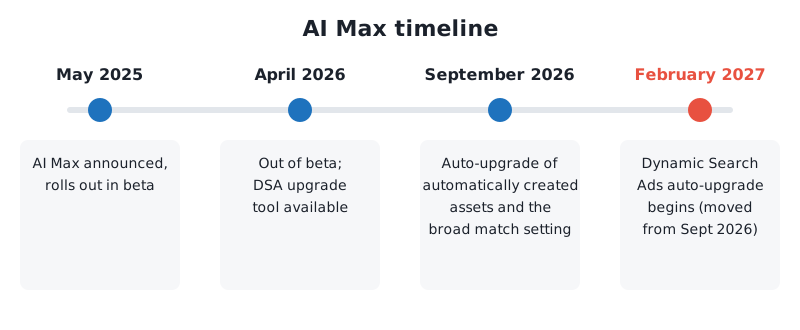
Google announced AI Max for Search campaigns in May 2025 and rolled it out to all advertisers in beta from late that month. It came out of beta in April 2026. It brings to Search the kind of automation Performance Max already had, while keeping what Search campaigns are good at: ad groups, keywords, negative keywords and the search terms report.
You turn it on per campaign. Inside it there are three features and a set of controls:
| Feature | What it does | Formerly |
|---|---|---|
| Search term matching | Expands beyond your keywords with broad match and keywordless technology | The campaign-level broad match setting, and the matching side of Dynamic Search Ads |
| Text customization | Writes new headlines and descriptions from your landing pages, ads, keywords and assets | Automatically created assets |
| Final URL expansion | Sends the visitor to a more relevant page on your domain than your final URL | The landing page side of Dynamic Search Ads |
And the controls:
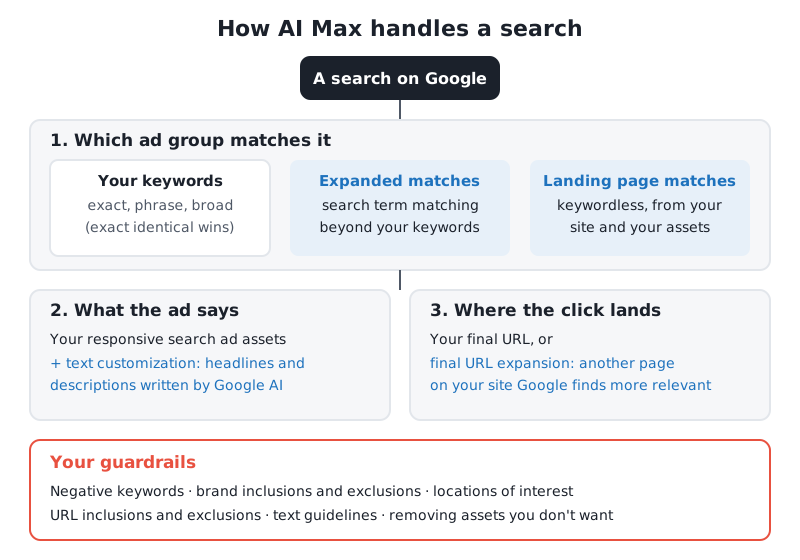
- Brand inclusions (campaign or ad group level): only show on searches related to the brands you choose.
- Brand exclusions (campaign level): never show on searches for brands you choose, usually your own or competitors’.
- Locations of interest (ad group level): match people by the place they are searching about, not only where they are. Google says this control is exclusive to AI Max.
- URL inclusions (ad group level) and URL exclusions (campaign level): which pages final URL expansion may and may not use.
- Text guidelines: words or phrases Google’s text must not use, and tone or messaging restrictions.
Search term matching
Search term matching takes your keywords as a starting point and reaches further. It uses two kinds of technology:
- Broad match expansion of your keywords. Even exact and phrase match keywords can lead to related searches once AI Max is on. In the keywords report this traffic is grouped in a row called Total: AI Max expanded matches.
- Keywordless matching. Google reads your landing pages and assets and matches searches to them directly, the way Dynamic Search Ads did. This traffic shows as Total: AI Max landing page matches.
It’s a campaign setting first and an ad group setting second: you switch search term matching on for the campaign, and then you can switch it off for individual ad groups. That matters for brand ad groups and tight exact match ad groups you want to keep as they are.
What happens to my exact match keywords? If a search is identical to one of your exact match keywords, that keyword is still preferred. Google says keywords and keywordless matches are otherwise prioritized the same way as in Search and Performance Max today. In practice, I check the AI Max rows of the keywords report after the first weeks, because expanded matches can take traffic your phrase and broad keywords used to get, and the question is whether it is extra traffic or the same traffic counted under a new name. If you’re cleaning up an account before turning AI Max on, start by removing duplicate keywords so you can read the results.
Text customization
Text customization is what Google used to call automatically created assets. Google writes headlines and descriptions from your domain, landing pages, existing ads, ad group keywords and assets, and uses them in your responsive search ads to fit each search.
What to know:
- It’s on by default when AI Max is on. Turning it off marks the generated assets as removed and stops them serving.
- Google-written assets are labelled Google AI in the Added by column of the asset report. You can remove individual ones there (bulk removal is in Google Ads Editor and the API).
- Text guidelines are your editorial control: exclude terms you can’t use (claims, prices, “free”, competitor names) and set tone or messaging restrictions.
For regulated businesses (health, finance, legal) text customization is the feature I’m most careful with. Google’s AI writes from your website, so if your website says something your ads may not say, your ads might.
Final URL expansion
Final URL expansion lets Google send the click to a different page on your domain when it predicts that page is more relevant to the search. It needs text customization: turn text customization off and final URL expansion goes off with it.
Your controls:
- URL exclusions (campaign level): pages or rules (such as URLs containing “careers” or “blog”) that expansion may never use. Note that “URL contains” rules match whole words, not parts of words.
- URL inclusions (ad group level): pages you want used for that ad group. With expansion on, both your pages and Google’s predicted pages can be used.
- Pinned headlines and descriptions may be ignored when final URL expansion or URL inclusions are on. If your ads depend on pinning (legal disclaimers, for example), turn both off.
The Landing pages report shows which pages were chosen by AI Max in its Selected by column, and you can add a URL exclusion straight from there.
How AI Max relates to broad match and Dynamic Search Ads
AI Max is where Google is putting several older features:
- Campaign-level broad match setting: replaced by search term matching. Google scheduled these campaigns to be upgraded automatically from September 2026, with search term matching on.
- Automatically created assets: now text customization. Also scheduled for automatic upgrade from September 2026, with search term matching and text customization on.
- Dynamic Search Ads: being retired. Google first said the automatic upgrade would start in September 2026, then in June 2026 moved the DSA sunset and auto-upgrade to begin in February 2027. When a campaign is upgraded, dynamic ad groups become standard ad groups, dynamic ads become responsive search ads, all three AI Max features are switched on and legacy URL targets are kept (they can be removed but no longer added or edited).
If you still run Dynamic Search Ads (see my beginner’s guide to Dynamic Search Ads for how they work), I’d rather upgrade on your own schedule than Google’s, so you can compare before and after. You can do it from Campaigns → Settings, select the campaign, then the Dynamic Search Ads panel and Upgrade. Your old dynamic ads keep serving until the new responsive search ads pass policy review.
How to turn AI Max on
Google’s help says AI Max is on by default for new Search campaigns, under Keywords and ads during setup, so check it rather than assume it’s off. For an existing campaign:
- Go to Campaigns → Settings and select your Search campaign.
- Open AI Max in the section menu.
- Switch it on and choose the features: search term matching, text customization and final URL expansion.
- Add your brand inclusions or exclusions (brand lists live in Tools → Shared library → Brand lists), URL exclusions and text guidelines before you save.
- Save. To switch it off later, go back to the same panel; turning it on again restores your previous settings.
You can change several campaigns at once from Campaigns → Settings: select them, then Edit → Change AI Max settings.
A safer way is an experiment: Google offers one-click experiments for AI Max, which split traffic between the campaign with and without it. My guide to custom experiments in Google Ads explains how to read one.
Reporting: what you can see
AI Max is more visible than Performance Max was at launch:
- Search terms report: filter the Match type column for AI Max to see searches it found. That filter leaves out “Other search terms”, so the totals can look lower than the campaign’s. Add the Source column to see where each match came from.
- Search terms and ad combinations (formerly “Search terms and landing pages from AI Max”): each search with the headline and landing page that were shown, by campaign and ad group. Add bad searches as negative keywords and bad pages as negative URLs from here.
- Keywords report: the two AI Max total rows described above, so you can see how much traffic came from beyond your keywords.
- Landing pages report: your URLs and expanded URLs, with Selected by.
- Asset report: performance of each asset, including the ones labelled Google AI.
Google recommends waiting at least two weeks after turning AI Max on before making changes such as adding negative keywords, and adding negatives only for terms that consistently underperform. I agree with the first part; for the second, a search that is obviously irrelevant (jobs, free, a different service) gets excluded on day one.
When to turn AI Max on
Google’s own figures: advertisers turning on AI Max typically see 14% more conversions or conversion value at a similar CPA or ROAS, and 27% for campaigns that mostly use exact and phrase match (non-retail, Google internal data, 2025). In 2026 it added that using all AI Max features gives 7% more than search term matching alone. Those are averages from Google, not a promise for your account.
My usual view:
| Situation | AI Max? |
|---|---|
| Conversion tracking measures real outcomes (sales, qualified leads, booked calls) and you use Smart Bidding | Good candidate; test it with an experiment |
| You already rely on broad match or Dynamic Search Ads | Yes, because they are moving into it anyway |
| Campaign limited by budget | Not yet. Google says AI Max won’t be effective in a budget-limited campaign |
| Manual CPC or Maximize clicks | No. The features need conversion-based Smart Bidding to work well |
| Regulated industry with strict ad copy rules | Search term matching maybe; text customization and final URL expansion only with tight guidelines and exclusions |
| Brand campaign | Keep it tight: switch search term matching off for brand ad groups or use brand inclusions |
Risks and guardrails
These are the problems I look for in accounts running AI Max:
- Paying for traffic you already had. If expanded matches replace searches your keywords would have caught anyway, the AI Max rows look like growth when they aren’t. Compare the campaign’s total conversions and cost, not only the AI Max rows.
- Irrelevant searches. Keywordless matching follows your website. A blog post about a topic you don’t sell can bring searches about it. Use URL exclusions and negative keywords.
- Wrong landing pages. Final URL expansion choosing the careers page, a blog post or the privacy policy. Check the landing pages report and add URL exclusions.
- Ad copy you didn’t approve. Text customization may write claims you can’t make. Set text guidelines first, and review the Google AI assets every few weeks.
- Brand traffic in the wrong campaign. Add a brand exclusion to non-brand campaigns so AI Max doesn’t take credit for people already looking for you.
- Location drift. Locations of interest can show your ads to people searching about your area from elsewhere. Useful for travel or relocation; not for a plumber.
Conversion tracking decides whether AI Max works
AI Max matches searches by predicting which ones will produce your conversion. If a conversion is a page view, a spam form submission or a duplicate, it will find more of those, very efficiently. Before turning it on:
- Make sure only real outcomes are primary conversions, and everything else is secondary.
- Turn on enhanced conversions, so conversions are matched when cookies are missing.
- For lead generation, import offline conversions (qualified leads, sales) from your CRM.
- Where you have EEA or UK traffic, have Consent Mode v2 in place, or you lose measurement for those visitors.
This is the part I fix first in most accounts. If your Google Ads numbers don’t match your CRM, my conversion tracking review and setup is the place to start.
FAQ
Is AI Max a new campaign type?
No. AI Max is a set of features you turn on inside a standard Search campaign. Your ad groups, keywords, negative keywords and reports stay where they are.
Does AI Max replace Dynamic Search Ads?
Yes. Google is retiring Dynamic Search Ads, and the automatic upgrade to AI Max is scheduled to begin in February 2027. You can upgrade earlier from the campaign’s Dynamic Search Ads settings panel.
Can I use AI Max without final URL expansion?
Yes. You can turn final URL expansion off and keep search term matching and text customization. You can also turn off text customization, which turns final URL expansion off as well.
How do I see which searches AI Max found?
In the search terms report, filter the Match type column for “AI Max”, or use the “Search terms and ad combinations” view to see each search with its headline and landing page.
Do negative keywords work with AI Max?
Yes. Negative keywords, brand exclusions and URL exclusions all apply. Google suggests waiting two weeks before adding many negatives, but obviously irrelevant searches should be excluded straight away.
Need help with AI Max?
I set up and audit Search campaigns with and without AI Max, and I always check the conversion tracking behind them before trusting the results. If you want to know whether AI Max is finding new customers or just renaming the ones you had, book a call and we’ll go through your account together.