4 ways to use Quality Score to improve your Google Ads performance (2026)
 Daniel Timponi · November 15, 2026
Quality Score is a 1 to 10 rating Google Ads gives each keyword in a Search campaign, built from three components: expected clickthrough rate, ad relevance and landing page experience. It’s a diagnostic, not an input in the ad auction, so the way to use it is to find which keywords, ads and landing pages are weaker than your competitors’ and fix those, starting where you spend the most.
Want a second pair of eyes on your account? I audit Google Ads accounts and turn Quality Score, search terms and conversion data into a clear list of fixes. Ask me about a Google Ads audit.
What Quality Score is
Google describes Quality Score as a diagnostic tool that gives you a sense of how well your ad quality compares with other advertisers. A few facts worth knowing before you use it:
- It’s reported per keyword, from 1 to 10. Higher means your ads and landing pages are more relevant and useful to people searching for that keyword than other advertisers’.
- It’s calculated from historical impressions for exact searches of your keyword. So changing a keyword’s match type doesn’t change its Quality Score.
- When the column shows a dash (—), there aren’t enough searches that exactly match the keyword to calculate a score.
- A broad match keyword can show a Quality Score with no impressions of its own, if the same keyword in exact match had impressions in the last 90 days.
- Quality Score is not an input in the ad auction. Google says so plainly. What the auction uses is quality measured at the moment of each search, for that search, device and context. Quality Score is a summary of that, after the fact.
That last point changes how you should think about it. You don’t “raise your Quality Score to get cheaper clicks”. You improve the things Quality Score measures, and the auction rewards those things. The score is the thermometer, not the heating.
The three components
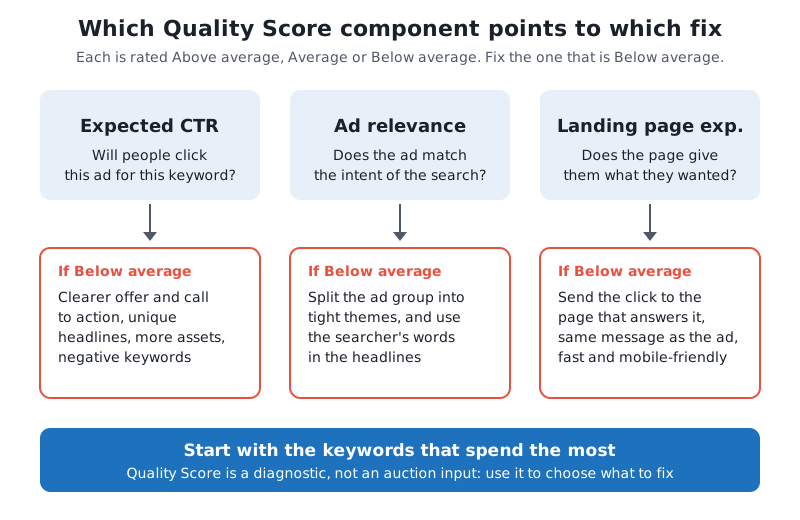
Each component is rated Above average, Average or Below average, compared with other advertisers whose ads showed for exactly the same keyword over the last 90 days.
| Component | What it measures | What usually drags it down |
|---|---|---|
| Expected CTR | How likely your ad is to be clicked when shown for that keyword, adjusted to remove the effect of ad position and assets | A generic ad, no clear offer, an ad group full of unrelated keywords |
| Ad relevance | How closely your ad matches the intent behind the search | One ad serving dozens of different services or products |
| Landing page experience | How relevant and useful your landing page is to people who click | Sending every click to the home page, slow pages, pages that don’t mention what was searched |
Expected CTR is different from the CTR column in your reports. Your CTR is what happened; expected CTR is Google’s prediction, with position and assets taken out of the equation. I explain the difference in what CTR means in Google Ads.
Google doesn’t publish how much each component weighs, so be wary of anyone who gives you exact percentages.
Where to see Quality Score
The columns aren’t shown by default. To add them:
- Go to Campaigns → Audiences, keywords, and content → Search keywords.
- Click the columns icon above the table.
- Open the Quality score section of the columns list.
- Add Quality Score, Exp. CTR, Ad relevance and Landing page exp.
- Click Apply.
The same section has the historical versions: Quality Score (hist.), Landing page exp. (hist.), Ad relevance (hist.) and Exp. CTR (hist.). The normal columns show the score now; the historical ones show past scores for the reporting period you selected. Segment the table by Day to see how a score changed day by day, which is the easiest way to check whether a new landing page or ad actually helped.
Save it as a column set so you don’t have to rebuild it every time.
Where Quality Score doesn’t apply
Quality Score lives on keywords in Search campaigns. That has consequences for newer campaign types:
- Performance Max has no keywords, so there is no Quality Score to read. Use the asset, search terms and conversion reports instead; see my Performance Max guide.
- AI Max for Search and broad match still report Quality Score on your keywords, because the score is based on exact searches for the keyword. But the extra searches they reach, including those matched without a keyword, aren’t described by that score. If you use them, the search terms report matters more than Quality Score. More in my guide to AI Max for Search campaigns.
- Display, Demand Gen and Shopping campaigns don’t show keyword Quality Score.
4 ways to use Quality Score
1. Find the weak keywords that cost you money
Quality Score is most useful as a filter. Sort the keywords table by Cost for the last 30 or 90 days, with the Quality Score columns next to it. Then look for:
- keywords with a high share of spend and a score of 1 to 4;
- keywords with any component Below average;
- historical scores that dropped recently.
A keyword with a low score and no spend isn’t a problem yet. A keyword with a low score that takes a large part of your budget is the first thing to fix. Before you change anything, check its conversions: a keyword with a mediocre score that brings leads at a good cost is doing its job.
Don’t pause keywords just to “raise the account’s Quality Score”. There’s no account-level score that Google uses, and pausing a profitable keyword because of a diagnostic is the most expensive mistake I see.
2. Fix ad relevance by tightening ad groups
When Ad relevance is Below average, the ad doesn’t speak to the search. The fix is almost always structural:
- Open the ad group and read its keywords. If they describe more than one service or product, split them. “Emergency plumber” and “water heater installation” need different ads.
- Write responsive search ads for each new ad group whose headlines use the words people search for. Google allows up to 15 headlines and 4 descriptions; use them for genuinely different messages.
- Check the search terms the ad group actually matched and add negative keywords for anything you don’t offer.
- Remove duplicate keywords that sit in more than one ad group, so each search goes to the ad written for it.
You don’t need one keyword per ad group. You need each ad group to be one theme that one set of ads can answer well.
3. Fix the landing page experience
When Landing page exp. is Below average, the ad may be fine but the page isn’t. Google’s guidance is to give people what they’re looking for. In practice:
- Send each ad group to the page about that service, not the home page.
- Make the page say what the ad promised, in the same words, above the fold.
- Make it fast and easy to use on a phone, and make the next step (call, form, booking) obvious.
- Be clear about who you are: contact details, real business information, what happens after the form.
If you build a new landing page, give it at least a few weeks of traffic and then compare the historical columns before and after. You can also test the new page against the old one properly with a Google Ads experiment.
4. Prioritize by spend, and judge by results
Quality Score works best alongside other numbers. Google itself suggests using it together with CTR, conversion rate and site engagement. My order of work:
| Priority | Keyword looks like | What I do |
|---|---|---|
| 1 | High spend, low score, poor conversions | Fix the Below average component first, or restructure |
| 2 | High spend, low score, good conversions | Improve carefully; don’t break what works |
| 3 | Low spend, high score, good conversions | Look for more reach: bids, budget, match types |
| 4 | Low spend, low score | Leave for later, or remove if irrelevant |
Expected CTR is the component that benefits most from good ads. Clear offers, specific headlines, a call to action and assets such as sitelinks all help people choose your ad, and Ad Rank also accounts for the expected impact of your assets. My Ad Rank guide explains how quality and bid combine in the auction.
Common mistakes I see
- Treating Quality Score as a KPI. Bonuses, reports and alerts built on it lead people to optimize a diagnostic instead of leads and sales.
- Confusing Quality Score with ad strength. Ad strength rates a responsive search ad’s headlines and descriptions. Google says it isn’t used to calculate Ad Rank or Quality Score.
- Expecting a match type change to fix it. Quality Score is based on exact searches, so switching from broad to phrase doesn’t change the score.
- Reading scores on tiny keywords. Keywords with few impressions show a dash or a score that moves with every handful of searches.
- Fixing the wrong component. Rewriting ads won’t help a Below average landing page experience, and a new page won’t fix an ad group that mixes ten services.
FAQ
What is a good Quality Score in Google Ads?
Google rates it from 1 to 10 and doesn’t define a target. In practice, look at the components: any Below average component on a keyword that spends real money is worth fixing. Average on all three means no major problem.
Does Quality Score affect cost per click?
Not directly, because it isn’t an auction input. The auction uses quality measured for each search, which covers the same things: expected CTR, ad relevance and landing page experience. Google says higher quality ads can often lead to lower costs per click.
Why does my keyword show a dash instead of a Quality Score?
There aren’t enough searches that exactly match the keyword yet. It’s common for new or long-tail keywords.
How often does Quality Score update?
Google doesn’t give a fixed schedule. Use the historical columns and segment by day to see when a keyword’s score changed.
Does Performance Max have a Quality Score?
No. Performance Max doesn’t use keywords, so there’s no keyword Quality Score. Judge it on conversions, conversion value and its asset and search terms reports.
Need help with your Quality Scores?
Quality Score tells you where to look; turning that into better ads, tighter ad groups and better landing pages is the work. I review your keywords, ads, pages and tracking together and give you a prioritized plan. Request a Google Ads audit.