Google Ads lead forms: what they are, how they work and how to create them (2026)
 Daniel Timponi · November 15, 2026
Google Ads lead forms (lead form assets, formerly lead form extensions) let people send you their name, email or phone number in a form hosted by Google, without visiting your website. In 2026 they work with Search and Performance Max campaigns, your account has to meet Google’s lead form policy, and you get the leads by CSV download (last 30 days only), email notification, a webhook, Zapier or the Google Ads API. They can bring in cheap leads, but without a way to send lead quality back to Google, they often bring in a lot of weak ones.
Thinking about lead forms, or getting leads nobody can follow up? I set up lead tracking, CRM delivery and offline conversion import for Google Ads: see my conversion tracking service.
What a lead form asset is
A lead form asset is a short form attached to your ad. Someone taps it, sees your headline and description, and their Google account details can fill in the contact fields for them. They submit, see your thank-you message, and Google stores the lead in your account.
There are two ways a lead form can show, and the conversion goals of the campaign decide which one you get:
- Lead form as one asset among others. If the campaign optimizes for lead form submissions plus other goals (website forms, calls), the ad’s headline still opens your website and the form shows as an extra option, much like a sitelink or a callout.
- Headline opens the form directly. If the campaign’s only conversion goal is Submit lead form (Google hosted) and it uses conversion-focused bidding, a click on the ad opens the form, not your website. This format has extra eligibility requirements (below).
Which campaigns support lead forms in 2026
Google’s help pages currently list Search and Performance Max as the campaign types for lead forms, on desktop and mobile. A few details matter:
- Search needs responsive search ads, which is all Search runs now that expanded text ads are gone.
- Performance Max adds the form as an asset, so it can show wherever the campaign serves.
- Video and Demand Gen: Video action campaigns used to offer lead form ads in beta, but they were upgraded to Demand Gen, and Google’s upgrade page says lead forms are available in Performance Max instead. If you want a lead form near YouTube inventory, Performance Max is the route. For how those campaign types differ, see Demand Gen vs Performance Max vs Display.
- One lead form per campaign, and one lead form at account level. A campaign-level form overrides the account-level one; if the campaign’s form is disapproved, the account-level form serves instead.
- The campaign must use a conversion-focused bidding strategy and include the Submit lead form (Google hosted) goal, even if it also optimizes for other conversions.
Eligibility and policy requirements
Lead forms follow Google’s Lead form requirements policy on top of the normal ad policies. Check these before you build anything:
- A good history of policy compliance on the account.
- An eligible vertical. Google’s policy page lists categories that can’t use lead forms: adult content, alcohol, gambling, healthcare and medicines, and political content. That healthcare line catches more businesses than people expect, so medical and dental advertisers should check before planning a campaign around lead forms.
- No affiliate networks or lead sellers. Google says lead generation businesses are not allowed at its discretion; first-party advertisers, and agencies with a direct relationship to the offer, are.
- A privacy policy link. It’s required and appears at the end of the form.
- Clear images that meet Google’s standards if you add a background image.
For the stricter formats (a Search ad whose headline opens the form directly, or Video and Display placements), the policy page adds a spend history: total Google Ads spend above $50,000 USD, or, for reputable advertisers, more than $1,000 per account (or more than $15,000 across all accounts), subject to account checks and completed advertiser verification. Google’s own pages have not always agreed on this threshold, so if the option is missing in your account, eligibility is the likely reason.
How to create a lead form in a new campaign
- Go to Campaigns in the Campaigns menu, click the plus button and choose New campaign.
- Choose Leads as the objective and make sure the Submit lead form (Google hosted) goal is included. Use Add goal if it isn’t there yet.
- Choose Search or Performance Max and click Continue.
- Enter your settings, then open the lead form editor:
- Search: in the Ads section, click + Lead forms.
- Performance Max: in the Assets section, click More asset types, then Lead forms.
- Click New lead form and enter a headline, your business name and a description. Say exactly what happens next (“We’ll call you within one business day with a quote”).
- Pick the contact questions: Name, Email or Phone number. At least one is required. Add custom questions with + Question under Custom questions.
- Enter your privacy policy URL.
- Write the submission message (headline and description) people see after they submit, and pick a call-to-action with its description.
- Set up lead delivery if you can: a webhook, Zapier, or email addresses for notifications (more below).
- If it’s your first lead form, accept the terms, then click Save.
To add an existing form to a campaign, go to Campaigns → Assets, open the Associations tab, click the Lead form summary card, tick the form and choose Add to → Campaign. The campaign needs Leads as its goal, and it runs once the form is approved. Some edits, such as adding a new custom question, send the form back to policy review and pause the campaigns using it until it’s approved, so don’t edit a working form on a busy Monday morning.
More volume or more qualified, and qualifying questions
Two settings decide how easy the form is to send:
- More volume (the default) has fewer steps and usually brings more leads, some less qualified.
- More qualified adds steps before the form is sent, and usually brings fewer, more interested leads. You can switch between them at any time.
Qualifying responses (Search campaigns only) turn one multiple-choice question into a filter: you pick the answers that mean a good prospect, such as “Ready to buy in the next 30 days” or a budget range. A lead with a qualifying answer is tagged as qualified, every lead carries a Lead stage in the CSV, webhook and API data, and Google adds a conversion called Lead form - Response qualified (Google-hosted) to the Qualified lead goal. Qualifying questions can’t be optional.
Search campaigns can also add phone number verification, a one-time code sent by SMS, which cuts down on fake numbers.
Getting the leads out
This is the part that goes wrong most. A lead that sits in Google Ads for a week is usually a lost lead.
| Method | What it does | Watch out for |
|---|---|---|
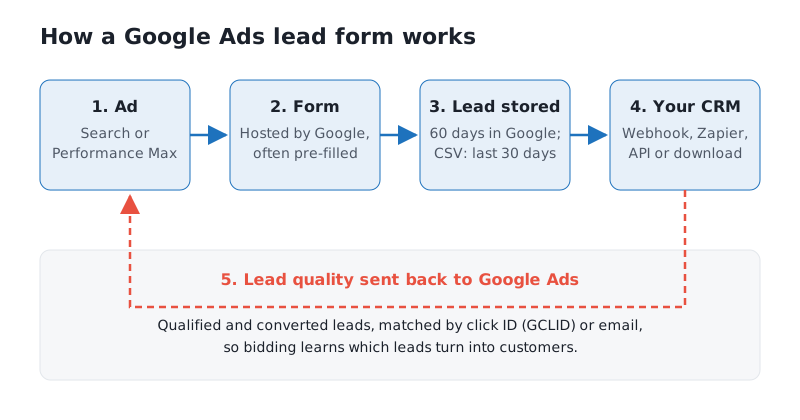
| CSV download | Campaigns → Assets → Lead form card, then CSV or CSV for CRM | Only the last 30 days can be downloaded; Google stores leads for 60 days |
| Email notifications | An email for each new lead | Fine for a backup, not a system |
| Webhook | Sends each lead to your CRM or your own endpoint as it arrives | You set a webhook URL and key; your side should check the key |
| Zapier | Sends leads to your CRM through a Zap, authorized from Google Ads | Needs a paid Zapier plan; one data integration per lead form |
| Google Ads API | Automatic export of up to 60 days of leads | Needs developer access |
The webhook data includes the lead’s answers, the form and campaign IDs, a test flag and, where available, the Google click ID (GCLID). Keep that click ID in your CRM: it’s what lets you send lead quality back later. A removed lead form can’t be restored, but you can still download the leads from its last 30 days.
Tracking lead form conversions and importing lead quality
You don’t need a website tag for lead forms. Each submission records the Submit lead form (Google hosted) conversion automatically.
The problem is that a submission is not a customer. Bidding that only sees submissions will happily find people who tap a pre-filled form and never answer the phone. The fix is to send results from your CRM back to Google Ads:
- Store the GCLID (or the lead’s email) with every lead in your CRM.
- Create offline conversion actions for the stages you care about, such as qualified lead and converted lead.
- Upload them as the lead moves through your pipeline, with a CSV, a Data manager connection, or Zapier. Google’s Zapier setup can be started from the lead form itself (Import conversions in the form editor).
I explain the full process in offline conversion import for Google Ads, and matching by email instead of click ID in enhanced conversions for leads. Once enough qualified leads come back, bid towards them with something like Target CPA set on the qualified stage.
Lead forms vs a landing page
| Lead form | Landing page | |
|---|---|---|
| Friction | Very low, details often pre-filled | Higher, needs a page load and typing |
| Lead volume | Often higher | Often lower |
| Lead quality | Often lower unless you qualify | Usually higher; people read about you first |
| Selling | A headline and a description | Your full pitch, reviews, photos |
| Tracking | Built in, no tag | Needs your own conversion tracking |
| Leads stored | Google keeps them 60 days | In your own system |
My view: lead forms work best as an extra option next to a good landing page, with qualifying questions on and a webhook into the CRM so someone calls the lead quickly. The headline-straight-to-form format can work for simple, quick-quote services, but I’d only run it once lead quality is being imported.
Common mistakes I see
- Nobody gets the leads. No webhook, no notification email, and leads expire from the download after 30 days.
- Too easy to submit. Pre-filled contact details and no qualifying question produce leads who don’t remember asking.
- Bidding only on submissions. Without offline import, the campaign optimizes for whoever submits most, not who buys.
- The wrong business type. Healthcare and the other restricted categories can’t use lead forms, and an account can lose time building one before finding out.
- Editing a live form. A new question sends it back to review and pauses the campaign.
- Not testing. Send a test lead through your webhook and check it lands in the CRM with the click ID before you spend.
FAQ
Are lead form extensions and lead form assets the same thing?
Yes. Google renamed extensions to assets. Lead form extensions are now lead form assets, and the setup has moved into the Assets section and the campaign builder.
Do Google Ads lead forms work on YouTube?
Not through Demand Gen. Video action campaigns had lead forms in beta, but those campaigns became Demand Gen, and Google points advertisers who need lead forms to Performance Max, which can serve on YouTube.
How long does Google keep lead form leads?
Google stores leads for 60 days, but you can only download the last 30 days as a CSV. Set up a webhook or Zapier so every lead reaches your CRM as it arrives.
Why can’t I create a lead form?
Usually the account isn’t eligible: a restricted category such as healthcare, a weak policy history, a missing privacy policy, or, for the headline-opens-form format, not meeting the spend and verification requirements. The campaign also needs the Leads objective and a conversion-focused bid strategy.
Can I see which lead form leads became customers?
Only if you send that information back. Keep the click ID or email with each lead and import qualified and converted leads as offline conversions.
Need help with Google Ads lead forms?
Lead forms are easy to switch on and easy to get wrong: the leads arrive, but nobody gets them in time, or the campaign learns to find people who never buy. If you want lead forms set up with CRM delivery and lead quality going back to Google, get in touch about your Google Ads.