Conversion optimization in Google Ads: a practical guide (2026)
 Daniel Timponi · February 20, 2023 · Updated November 15, 2026
Conversion optimization in Google Ads means getting more leads or sales, or more valuable ones, from the same budget. In 2026 most of the work happens before the ad: accurate conversion tracking that tells Smart Bidding what a good result is, then cleaning up who sees your ads, then the landing page and form that turn a click into a conversion. Work in that order, test one change at a time, and review on a fixed schedule.
Want someone to find where your account is losing conversions? I manage and audit Google Ads accounts and tell you what to fix first. Talk to me about your account.
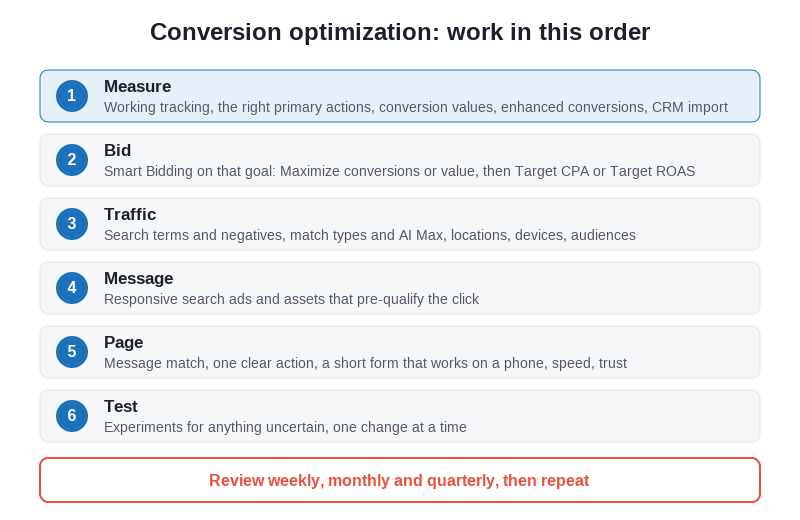
Work in this order
Most advice on this topic is a list of thirty tips with no order. The order matters, because each layer depends on the one before it. Better ads won’t help if bidding is learning from the wrong conversion, and a better landing page won’t help if half the clicks come from searches you never wanted.
If your problem right now is clicks with no conversions at all, start with my diagnostic guide, why Google Ads clicks don’t convert. This post is about improving an account that already converts.
1. Measure the right thing
Google Ads optimizes towards whatever you tell it is a conversion. If that is wrong, every automated decision in the account is wrong in the same direction.
Decide what a conversion is
Write down the one or two actions that actually make you money: a purchase, a qualified lead, a booked call. Everything else (page views, button clicks, scroll depth, newsletter sign-ups) is at most a supporting signal.
Primary and secondary actions
In Goals → Conversions → Summary, each conversion action is either primary or secondary. Only primary actions appear in the Conversions column and are used by bidding for campaigns that use that goal. Secondary actions show only in All conversions, for observation.
The two mistakes I see most:
- Soft actions set as primary. A “contact page view” or “phone number click” counted next to real form submissions. Bidding finds the cheapest people to do the soft thing.
- The same lead counted twice. A Google Ads tag and an imported GA4 key event both primary for the same form. I explain how to choose between them in GA4 key events vs Google Ads conversions, and why their numbers never match in conversion discrepancies between Google Ads and GA4.
Give conversions a value
If some conversions are worth more than others, say so. Use the real order value for ecommerce. For lead generation, give each action a value that reflects what it’s worth to you (a quote request worth more than a newsletter sign-up, for example). Values let you move from counting conversions to bidding on value with Maximize conversion value or Target ROAS, and they make the reports answer the question you care about.
Make the tracking more complete
- Enhanced conversions send hashed first-party data (such as the email address a person typed into your form) with the conversion, which recovers conversions that cookies alone would miss. For lead forms, see enhanced conversions for leads explained.
- Offline conversion import sends what happened after the form back from your CRM: qualified, quoted, won. Once that data flows, you can make “qualified lead” or “sale” the primary action, and Smart Bidding learns from customers instead of form fills. Step by step in offline conversion import from your CRM.
- Consent Mode v2 is required for traffic from the EEA. Without it, Google Ads gets far less data from those visitors. See Consent Mode v2 with Google Tag Manager.
Before any of this, check that the basics work: the status in the conversions summary, a real test lead followed through, auto-tagging on. If something is off, Google Ads conversion tracking not working walks through the fixes.
Not sure your tracking tells the truth? This is the part of an account I’d fix before anything else, because every other optimization depends on it. See my conversion tracking service.
2. Bid on the right goal with Smart Bidding
With trustworthy conversion data, Smart Bidding is usually the best tool for conversion optimization. It sets a bid for each auction from signals no person can weigh by hand, like the query, device, location, time and audience lists.
| Strategy | Use it when |
|---|---|
| Maximize conversions | You want as many conversions as the budget allows and every conversion is worth about the same |
| Target CPA | You know the most you can pay for a conversion and have a steady flow of conversions |
| Maximize conversion value | Conversions have different values and you want the most total value for the budget |
| Target ROAS | You have reliable values and a return you need to hit |
Two changes in 2026 matter here. Since June 2026, Target CPA and Target ROAS appear under their own names again (before that they were “Maximize conversions with a target CPA” and “Maximize conversion value with a target ROAS”); Google says the bidding itself didn’t change. And since August 17, 2026, a Target CPA or Target ROAS campaign that is limited by budget bids towards your target rather than lowering bids to fit the budget, so a loose target now costs you more. Details in Target CPA bidding explained, and the full list of strategies in automated bidding strategies explained.
Practical rules I follow:
- Start without a target, then add one once the campaign converts steadily and you know your real cost per conversion.
- Change targets in small steps and give each change time before judging it. Big jumps reset what the strategy learned.
- Watch the bid strategy status. Learning, Limited and Misconfigured each mean something different; see bid strategy statuses explained.
- Use data exclusions when tracking broke for a few days, so bidding ignores the bad data, and seasonality adjustments for short, predictable spikes like a flash sale.
3. Clean up who sees your ads
Bidding can only choose among the searches your keywords and settings let in. Cleaning that up is where most accounts I audit find money.
Search terms and negative keywords
Open Campaigns → Insights and reports → Search terms every week and sort by cost. Add clearly wrong searches as negative keywords (“free”, “jobs”, “DIY”, services you don’t offer, places you don’t serve), and build shared negative lists for the ones that apply everywhere. Look at conversions per search term too: a term that spends and never converts is a candidate for a negative or a separate, cheaper ad group. How to read the report, including AI Max and Performance Max terms, is in the search terms report guide.
Match types, broad match and AI Max
Broad match and AI Max for Search reach searches your keyword list doesn’t contain. With good conversion data and Smart Bidding, that often finds conversions you’d miss. With weak data, it drifts. Turn them on after tracking is solid, check the search terms and landing pages they produce, and keep your negatives current. AI Max also replaces Dynamic Search Ads, which Google is upgrading automatically from February 2027. See AI Max for Search explained.
Also check that your own keywords don’t compete with each other: remove duplicate keywords.
Locations and devices
Check that location options use Presence if you serve a fixed area, not “Presence or interest”. Segment by device and compare conversion rate: a big gap usually points at a page that doesn’t work on that device, which you fix on the page, not with a bid.
Audiences
Audience segments help in two ways. On Observation, they let you see how past visitors, customer lists or in-market segments convert without limiting reach; on Targeting, they restrict a campaign to those people. With Smart Bidding, adding your data segments on Observation gives bidding extra signals. The difference is in targeting vs observation, and search remarketing in how to use RLSA.
4. Write ads and assets that pre-qualify
The ad’s job is not to get the most clicks. It’s to get clicks from people who will convert and put off people who won’t.
- Responsive search ads. Give each ad group up to 15 headlines and 4 descriptions that cover what the searcher wants, your main benefit, proof (reviews, years, licenses), the offer and a clear next step. Pin only what has to be in a fixed place, such as a legal line.
- Say what qualifies. Prices or “from” prices, service area, minimum order: a few words in the ad save you clicks from people who were never going to buy.
- Match the keyword theme. Tight ad groups make it easier to write ads that repeat what was searched.
- Use assets (formerly called extensions). Sitelinks to your most useful pages, callouts for benefits, structured snippets, call and location assets where they fit. They make the ad bigger and answer questions before the click. See sitelink assets and callout assets.
Judge ads by conversions and cost per conversion, not by click-through rate alone, and treat Ad strength as a checklist for variety, not as a performance score.
5. Make the landing page convert
This is where the conversion actually happens, and it’s the part of the funnel Google Ads can’t fix for you.
- Message match. The headline repeats what the ad promised and what was searched. Send each ad group to the most specific page you have, never the home page by default.
- One goal per page. A clear call to action above the fold on mobile: a short form, a tappable phone number, or both. Remove distractions that lead away from it.
- Short forms. Ask for what you need to follow up and nothing more. Every extra field costs completions.
- Test the form on a phone. Validation that rejects normal phone numbers, a broken CAPTCHA, a button that does nothing in Safari: these are more common than you’d think.
- Speed. Test the page in PageSpeed Insights on mobile and fix the largest problems first.
- Trust. Real reviews, an address, licenses, guarantees and clear pricing.
- A page Google can reach. Broken redirects or blocked pages lead to disapprovals; see destination mismatch and how to fix it.
6. Test changes with experiments
When you’re not sure a change helps (a new bid strategy, a target, broad match, AI Max, a new landing page), test it instead of switching. Under Campaigns → Experiments you can split a campaign’s traffic between the original and a copy with one change, then apply the change only if it wins. Google recommends running an experiment for at least 4 to 6 weeks, longer if conversions take a while to come in. How to set one up and read the results: custom experiments in Google Ads.
To test a landing page inside Google Ads, an ad variation that swaps the final URL is the simplest route; otherwise use your website’s own A/B testing tool.
7. Review on a fixed schedule
Conversion optimization is never finished, but it shouldn’t be daily tinkering either. Smart Bidding needs stable conditions to learn, and conversions that arrive days after the click make the last few days look worse than they’ll end up. A schedule I use:
| How often | What to check |
|---|---|
| Weekly | Search terms and negatives, conversion action statuses, budget pacing, anything disapproved |
| Every 2 to 4 weeks | Cost per conversion or ROAS by campaign, bid strategy statuses, ad and asset performance, landing pages report |
| Monthly or quarterly | Targets, conversion values, account structure, a full tracking check against your CRM, experiment results |
Compare periods of the same length, allow for conversion delay, and change one thing at a time so you know what worked. If you’d like a structured way to do the big review, my Google Ads audit checklist goes through each area.
Common mistakes
- Optimizing before measuring. Weeks of changes based on conversions that were counted wrong.
- Bidding on soft actions. Page views or clicks as primary conversions teach bidding to find people who click, not people who buy.
- Changing too much at once. New targets, new ads and a new page in the same week, and no way to know what helped.
- Judging too early. Turning things off after a few days, before conversions have had time to arrive.
- Ignoring lead quality. Optimizing for more form fills when sales says half of them are junk. Import the outcome from your CRM and bid on that.
- Sending everything to the home page. Still the most common landing page problem I see.
FAQ
What is a good conversion rate in Google Ads?
It depends on the industry, the offer and what you count as a conversion, so compare against your own history rather than an average from elsewhere. A rising conversion rate with a falling lead quality is not an improvement.
Which bid strategy is best for conversions?
With reliable tracking, Smart Bidding: Maximize conversions or Target CPA if every conversion is worth about the same, Maximize conversion value or Target ROAS if values differ. Start without a target and add one once conversions are steady.
How long should I wait before judging a change?
Long enough for the bid strategy to settle and for delayed conversions to come in, usually at least a few weeks. For an experiment, Google recommends 4 to 6 weeks.
Do I need enhanced conversions?
If you collect an email or phone number in your forms or checkout, yes. It recovers conversions that would otherwise go unrecorded and gives Smart Bidding more data to learn from.
Should I optimize for leads or for sales?
For sales or qualified leads whenever you can send that data back from your CRM. Bidding on raw form fills rewards volume, not customers.
Need help optimizing your Google Ads conversions?
I’ll check your tracking, bidding, search terms and landing pages, and give you a clear, ordered list of what will bring more conversions from the budget you already spend. Get in touch about your Google Ads account.