Google Ads audit checklist (2026)
 Daniel Timponi · November 15, 2026
A Google Ads audit is a structured review of an account to find where money is being wasted and where results are being left on the table. Start with conversion tracking, because every bidding decision and every report depends on it, then work through settings, structure, bidding, search terms, ads and assets, audiences, Performance Max, landing pages, budgets and reporting. The checklist below is the order I follow, with one line on why each item matters.
Want a second pair of eyes on your account? I audit Google Ads accounts and tell you exactly what to fix, in order. Ask me for a Google Ads audit.
Why the order of an audit matters
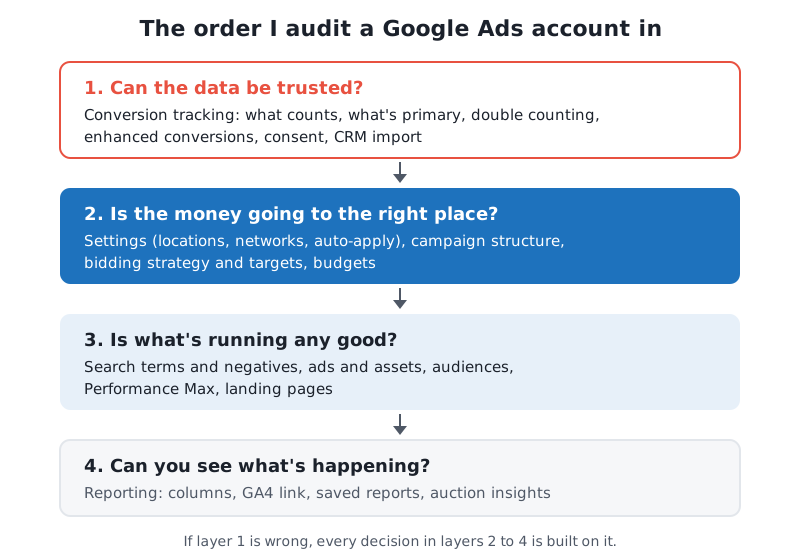
Most audits I’m asked to look at start with keywords and ad copy, because that’s what’s visible. The problem is that Smart Bidding, your reports and every recommendation Google makes all run on the conversions you record. If those are wrong, a “winning” keyword may be one that sends spam form fills, and the campaign you’re about to pause may be the one that brings in customers.
So I check in layers: first whether the data can be trusted, then whether the money is going to the right place, then whether what’s running is good, and finally whether you can see what’s happening.
Before you start
- Get the right access. Ask for Standard or Admin access with your own login; see how to add users to a Google Ads account. Read-only access hides some settings.
- Pick a date range with enough data. The last 90 days is a good default, with the same period last year where the business is seasonal.
- Ask what a good lead or sale is worth. Without a target cost per lead or a return you need, you can’t tell good results from bad.
- Check the change history. Change history shows who changed what and when; a drop in results often lines up with a change nobody remembers making.
1. Conversion tracking
This is the section that decides whether the rest of the audit means anything.
- List every conversion action and its source. Website tag, GA4 import, calls, offline import: you need to know where each number comes from.
- Check which actions are primary. Only primary actions in the campaign’s goals are used for bidding; a newsletter signup set as primary teaches Google to find newsletter signups.
- Look for double counting. The same form counted by the Google Ads tag and by an imported GA4 key event, both primary, doubles every lead.
- Check the count setting. Leads should usually count One per click; purchases Every. “Every” on a lead form inflates conversions with repeat submissions.
- Test the conversion end to end. Submit a real test lead and confirm it shows up; a status of “Active” doesn’t prove the right page or event fires.
- Check enhanced conversions. Enhanced conversions for leads recovers conversions that cookies miss and makes CRM imports match better.
- Check consent. If you have visitors in the EEA, Consent Mode v2 has to be in place, or measurement and remarketing suffer there.
- Ask what happens after the lead. If sales qualify leads in a CRM, offline conversion import lets bidding learn from customers rather than form fills.
- Check values. If some conversions are worth more than others and you bid on value, the values need to be real numbers, not the default 1.
- Check the conversion window. The default click-through window is 30 days; a longer sales cycle needs a longer window, or late sales go missing.
2. Account and campaign settings
- Auto-tagging is on. Without it, GA4 can’t attribute traffic to campaigns properly and offline imports have no click ID to match.
- The account time zone and currency are right. Both are fixed once the account is created; see the account time zone explained for why it matters for schedules and imports.
- Location options. The default is “Presence or interest”, which can show your ads to people who aren’t in your area. A local business usually wants Presence.
- Networks on Search campaigns. Search partners and the Display Network option can be ticked on Search campaigns; check each one is a choice and look at its results separately.
- Language and geography match the market. For multi-country accounts, review the settings to check before launching international campaigns.
- Auto-applied recommendations. In Recommendations, check what’s set to apply automatically. Changes to keywords, bidding or assets you didn’t choose are a common surprise.
- Ad schedule. If you only answer calls during business hours, call-focused ads shouldn’t run at 3 a.m.
3. Campaign structure
- Each campaign has one job. Brand, non-brand, competitors and remarketing mixed in one campaign hide what each is really doing.
- Brand is separated. Brand searches convert cheaply and make a blended campaign look much better than its non-brand traffic is.
- Ad groups are tightly themed. One theme per ad group lets the ad and landing page match the search.
- No duplicate keywords competing. The same keyword in several ad groups or campaigns splits data; find and remove duplicate keywords.
- Not over-split. Dozens of tiny campaigns starve Smart Bidding of data. Consolidate where the goal, budget and location are the same.
- Campaign types fit the goal. Check that Performance Max, Demand Gen, Display and Shopping are each used for what they’re good at; my Demand Gen vs Performance Max vs Display comparison covers the differences.
4. Bidding
- The strategy matches the data. Target CPA or Target ROAS needs steady conversion volume; with very few conversions, Maximize clicks or Maximize conversions may be a better start. See automated bidding strategies explained.
- Targets are realistic. A Target CPA far below what the campaign has achieved strangles its traffic.
- Budget-limited target campaigns. Since August 17, 2026, a Target CPA or Target ROAS campaign that is “Limited by budget” bids towards its target rather than beating it, so review targets on those campaigns.
- Bid strategy status. “Learning”, “Limited” or “Misconfigured” each mean something specific; check them against bid strategy statuses explained.
- Data exclusions. If tracking broke for a few days, a data exclusion stops Smart Bidding from learning from the gap.
- Changes are given time. Changing targets every few days keeps a campaign in learning; look for that pattern in the change history.
5. Keywords and search terms
- Read the search terms report. It shows what people actually typed. This is where most wasted spend shows up.
- Negative keywords exist and are maintained. Add irrelevant terms as negatives, at the campaign level or in shared negative keyword lists.
- Match types are understood. Broad match with Smart Bidding can work well, but only with good conversion data and active search term review.
- Brand exclusions where needed. Brand exclusions can keep non-brand campaigns, AI Max and Performance Max from picking up your brand searches.
- AI Max is checked if it’s on. AI Max for Search campaigns expands beyond your keywords; review the search terms and landing pages it chooses.
- Low-volume and zero-impression keywords. Hundreds of keywords with no traffic make the account harder to read without adding anything.
- Use the right tool for research. For new keyword ideas and volumes, the Keyword Planner is still the starting point.
6. Ads and assets
- Each ad group has a responsive search ad with enough variety. Up to 15 headlines and 4 descriptions; repeating the same message 15 times gives Google nothing to test.
- Pinning is deliberate. Pinning everything turns a responsive ad into a fixed one; pin only what must appear, such as a required disclaimer.
- Ads match the search and the landing page. The keyword’s promise should be on the page the ad sends people to.
- Assets are filled in. Sitelinks (formerly sitelink extensions), callouts, structured snippets, calls and your business name and logo make ads bigger and more useful.
- Automatically created assets are reviewed. Google can generate headlines and other assets; check that what it writes is accurate for your business.
- No disapprovals left unresolved. A disapproved ad or asset is silently not running; a common one is destination mismatch.
- Final URLs work. Broken pages, redirects that drop the click ID, and slow mobile pages all cost conversions. See what a URL in Google Ads is made of.
7. Audiences
- Your data segments are connected. Website visitors and customer lists give bidding and reporting extra signals.
- Observation vs targeting is set on purpose. On Search, observation adds data without narrowing reach; targeting restricts it. The difference is in targeting vs observation.
- Remarketing on Search is used where it fits. RLSA lets you treat past visitors differently.
- Audience segments are named in today’s terms. Similar audiences are gone; old setups that relied on them need replacing. My guide to audience targeting covers what exists now.
8. Performance Max
- Conversion goals are right for PMax specifically. PMax optimizes hard towards whatever it’s told to; a soft goal makes it find soft conversions.
- Search terms and channel reports are read. PMax now has a search terms report and a channel performance report; look at where the money goes.
- Negative keywords and brand exclusions are set. PMax supports campaign-level negative keywords and brand exclusions now.
- Final URL expansion is a decision. It’s on by default and can send people to pages you didn’t pick; add URL exclusions or turn it off.
- Asset groups have real creative. Low-quality or missing images and videos mean Google fills the gaps itself.
- PMax isn’t cannibalizing brand. Compare brand search costs before and after PMax launched.
My Performance Max guide goes through each of these in more detail.
9. Landing pages
- The page matches the ad. Same offer, same words, same location.
- Mobile speed and usability. Most searches are on phones; a slow page or a form that’s hard to fill loses leads you paid for.
- The form or call button is easy to find. And the phone number on the page is tracked.
- Forms carry the click ID. If leads go to a CRM, the form should keep the GCLID for later import.
- Test pages properly. Use experiments rather than changing the page and guessing.
10. Budgets
- Budget goes to what converts. Campaigns that are limited by budget while others waste money is a common imbalance.
- Daily budgets are understood. A campaign can spend up to twice its average daily budget on a given day, but not more than about 30.4 times the daily budget in a month.
- Shared budgets are deliberate. A shared budget can let a weak campaign take spend from a strong one.
- Overspending is monitored. Automated rules and alerts catch problems before the invoice does.
11. Reporting
- Columns show business results. Cost per conversion and conversion value next to clicks, not clicks alone.
- GA4 and Google Ads are linked. And the differences between their numbers are understood, not “fixed”.
- Saved reports exist. Custom reports in Google Ads save time and keep everyone looking at the same numbers.
- Competitors are watched. Auction insights show who you compete with; see how to identify your biggest competitors.
What I find most often in audits
Every account is different, but the same problems come up again and again:
- Conversion tracking that counts the wrong thing. Page views of a thank-you page that loads on its own, a form counted twice, or a newsletter signup treated like a sale.
- Smart Bidding trained on bad data. Because of the first point, the bidding is doing exactly what it was told and finding the wrong people.
- Search terms nobody has read. Broad match running for months without negatives, paying for searches that have nothing to do with the business.
- Brand mixed with everything else. The account looks profitable overall while non-brand traffic loses money.
- Auto-applied recommendations nobody remembers turning on. Keywords added, bidding changed, assets created.
- Location set to “Presence or interest” for a business that can only serve its own area.
- Performance Max left on defaults. Final URL expansion on, no brand exclusions, no look at its search terms.
- No connection to what happens after the lead. Google Ads sees form fills; the business only cares about the ones that become customers.
None of these are hard to fix once they’re found. The cost comes from how long they run unnoticed.
Common audit mistakes
- Starting with ad copy. Rewriting ads in an account that counts the wrong conversions changes nothing that matters.
- Changing everything at once. If you fix tracking, restructure campaigns and change bidding on the same day, you won’t know what worked. Fix tracking first, then make changes in stages.
- Trusting the optimization score. It measures how many of Google’s recommendations you’ve applied, not how well the account performs.
- Judging on too little data. A week of results on a low-volume account is noise.
FAQ
How long does a Google Ads audit take?
For a small to mid-sized account, a careful audit usually takes several hours to a couple of days, depending on the number of campaigns, the conversion setup and how much history there is. Tracking problems that need testing on the website take longer.
How often should I audit my Google Ads account?
A full audit once or twice a year, and a lighter monthly check of search terms, conversion tracking and budgets. Audit again after any big change: a new website, a new CRM, a new campaign type or a change in who manages the account.
Can I audit my own Google Ads account?
Yes, and this checklist is a good start. The hard parts are the ones that need an outside view: testing tracking end to end, knowing what’s normal for an account like yours, and deciding what to fix first.
What access does someone need to audit my account?
Read-only access is enough to look at most of the account, but Standard access shows more of the conversion setup. You never need to share your password; add the auditor as a user with their own email and remove them afterwards.
Is the Google Ads optimization score an audit?
No. It’s a list of Google’s recommendations, many of which increase spend. Some are useful, but it doesn’t check whether your conversions are right or whether you’re making money.
Need a Google Ads audit?
I’ve been auditing and managing Google Ads accounts for 17 years, and I always start where the problems usually are: the conversion tracking. You get a clear list of what’s wrong, why it matters and what to fix first. Book a call and we’ll look at your account together.